memcpy vs memmove in C: overlapping memory explained
Choose memcpy or memmove in C by checking overlap, copy direction and buffer capacity. Follow a text insertion, a byte trace and a practice exercise.
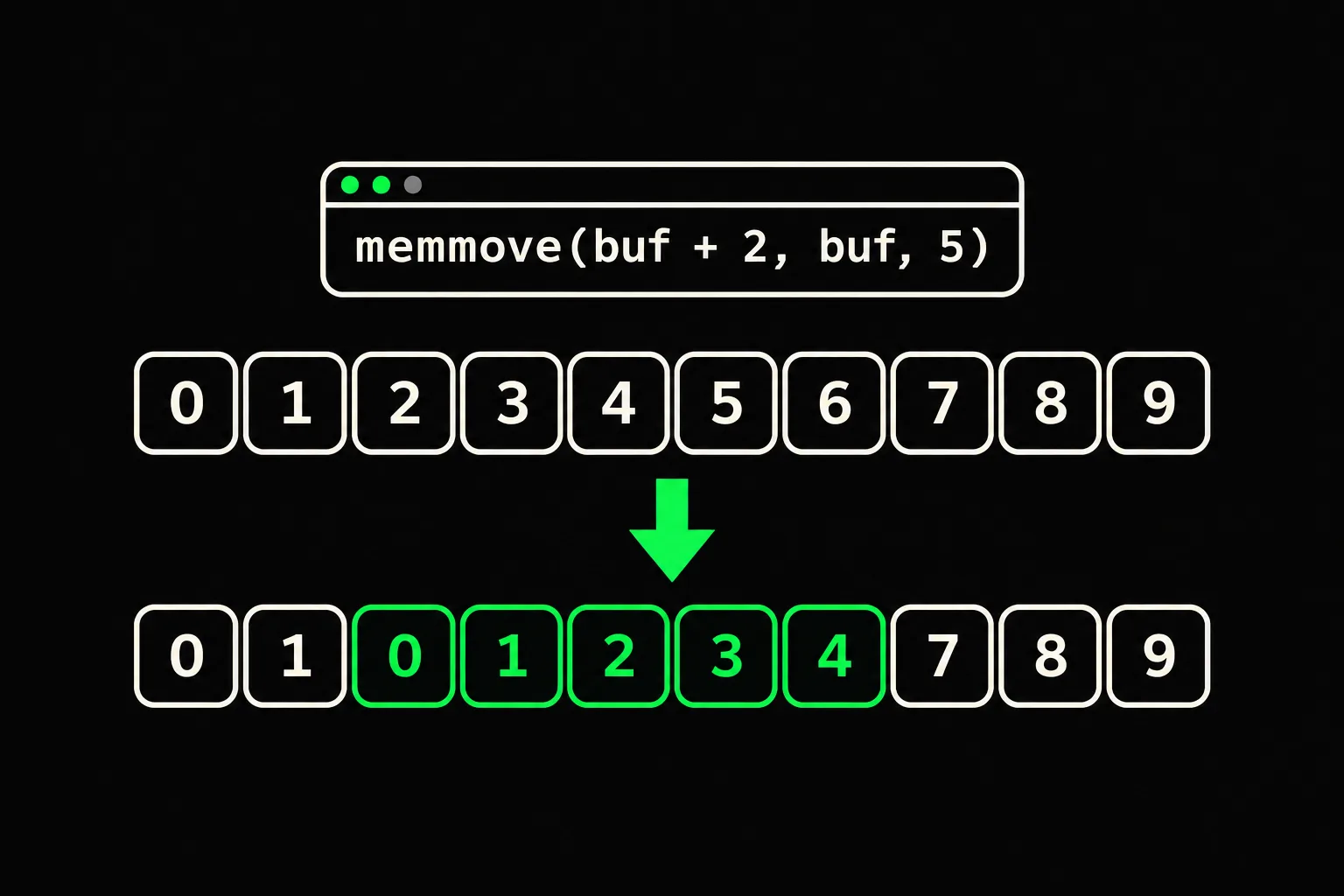
You're shifting part of an array to insert some text. The sizes look right, but your copy loop repeats characters instead of preserving the data you meant to move.
In short
Use memcpy(3) to copy bytes between memory regions that do not overlap. If source and destination may share bytes, use memmove(3): the destination will receive the values the source held before the call. Both functions take a byte count, return the destination and add no null terminator; providing enough storage is still your responsibility.
What does overlapping memory mean?
Two regions overlap when at least one byte belongs to both. Copying five bytes from buf to buf + 2 reads indices 0 through 4 and writes indices 2 through 6. Indices 2, 3 and 4 belong to both regions.
| Region | Indices | Contents before the copy |
|---|---|---|
| Source | 0, 1, 2, 3, 4 | 01234 |
| Destination | 2, 3, 4, 5, 6 | 23456 |
| Shared region | 2, 3, 4 | 234 |
Being in the same array does not automatically mean overlap: two disjoint slices of that array can be copied with memcpy(3). The byte ranges matter, rather than the names of the pointers.
Why can a forward copy overwrite its own source?
It writes to a position it still needs to read. This deliberately naive loop stays within the array bounds.
#include <stddef.h>#include <stdio.h>
int main(void){ char buf[] = "0123456789"; for (size_t i = 0; i < 5; ++i) buf[i + 2] = buf[i]; puts(buf); return 0;}$ gcc -std=c17 -Wall -Wextra -Werror naive.c -o naive$ ./naive0101010789The first iteration writes '0' to position 2. On the third iteration, the loop reads position 2, which no longer holds the original '2'.
| Iteration i | Byte read | Write target | Array after the write |
|---|---|---|---|
| 0 | '0' | buf[2] | 0103456789 |
| 1 | '1' | buf[3] | 0101456789 |
| 2 | '0' | buf[4] | 0101056789 |
| 3 | '1' | buf[5] | 0101016789 |
| 4 | '0' | buf[6] | 0101010789 |
This output describes this particular loop. It does not predict the result of memcpy(buf + 2, buf, 5): that call would have undefined behavior. A library could copy in another order, process several bytes at once or appear to produce the intended result. None of those outcomes makes the call valid.
How does memmove preserve the original bytes?
memmove(3) guarantees that each destination byte receives the corresponding source byte from before the copy, even when the regions overlap. For this right shift, a backward copy could meet that contract: read position 4 before writing position 6, then position 3 before position 5, down to position 0.
The other direction matters too. Moving a region to lower indices can be done with a forward copy. Here are both shifts, starting with identical arrays:
#include <stdio.h>#include <string.h>
int main(void){ char right[] = "0123456789"; char left[] = "0123456789"; memmove(right + 2, right, 5); memmove(left, left + 2, 5); puts(right); puts(left); return 0;}$ gcc -std=c17 -Wall -Wextra -Werror shift.c -o shift$ ./shift01012347892345656789The count 5 moves just five bytes. Positions outside the destination retain their contents; the terminator at index 10 is untouched. Despite its name, memmove(3) does not erase the source after copying.
Copy direction explains one possible implementation, rather than a requirement on your libc's internals. For practice, start by reasoning about two slices of the same array. A dst > src comparison between pointers to independent objects is not a general, portable C test for overlap.

memmove
Implement the overlapping copy in gm_memmove. Check shifts in both directions, identical ranges and n == 0, without treating a null byte as the end of the copy.
How do you insert text without losing the terminator?
Move the suffix together with its null terminator, after checking the capacity. This program reserves nine bytes, keeps the prefix ab, opens two positions and fills them with XY.
#include <stdio.h>#include <string.h>
int main(void){    char text[9] = "abcd";    size_t at = 2;    size_t added = 2;    size_t length = strlen(text);
if (at > length || added > sizeof text - length - 1) return 1; memmove(text + at + added, text + at, length - at + 1); memcpy(text + at, "XY", added); puts(text); return 0;}$ gcc -std=c17 -Wall -Wextra -Werror insert.c -o insert$ ./insertabXYcdThe move copies length - at + 1 bytes: the + 1 includes the terminator. memcpy(3) then works for XY, whose storage is separate from text. Those two copied bytes do not include its terminator; the moved suffix already terminates the result.
The capacity check uses sizeof text because text is an array in this scope. In a function receiving char *text, pass the capacity separately: a pointer does not carry the array size. The check also assumes the initial text is already terminated within the buffer.
Does memmove stop at a null byte?
No. A null byte is data, just like any other byte.
#include <stdio.h>#include <string.h>
int main(void){ unsigned char data[] = {0x41, 0x00, 0x42, 0x43, 0x44, 0x45}; memmove(data + 1, data, 4); for (size_t i = 0; i < sizeof data; ++i) printf("%02X%c", (unsigned int)data[i], i + 1 == sizeof data ? '\n' : ' '); return 0;}$ gcc -std=c17 -Wall -Wextra -Werror bytes.c -o bytes$ ./bytes41 41 00 42 43 45All four bytes 41 00 42 43 were copied, including those after 00. For text, you decide whether the count includes the terminator; for binary data, keep an explicit length. The C strings guide explains what the terminator changes for text functions.
Frequently asked questions
Is memcpy always faster than memmove?
No. It depends on sizes, addresses, the compiler and the library. First choose a function whose contract your call meets; a performance gain cannot justify overlap with memcpy(3).
Does memmove enlarge the destination?
No. It allocates no storage and does not check capacity. The source must allow the requested reads, and the destination must allow the writes.
Can I copy a region onto itself?
Yes with memmove(3), provided the region and count are valid. For a nonempty copy, use it rather than passing overlapping source and destination to memcpy(3).
What does n == 0 mean?
No bytes are copied. That does not give blanket permission to pass invalid pointers to library functions; keep valid pointers in your calls.
Sources