Strings in C: '\0', strlen, strcpy vs strncpy, strcmp
A C string is a char array terminated by '\0'. What that changes for strlen, strcpy, strncpy, strcmp, strdup and fgets, with the warnings GCC 15 prints.
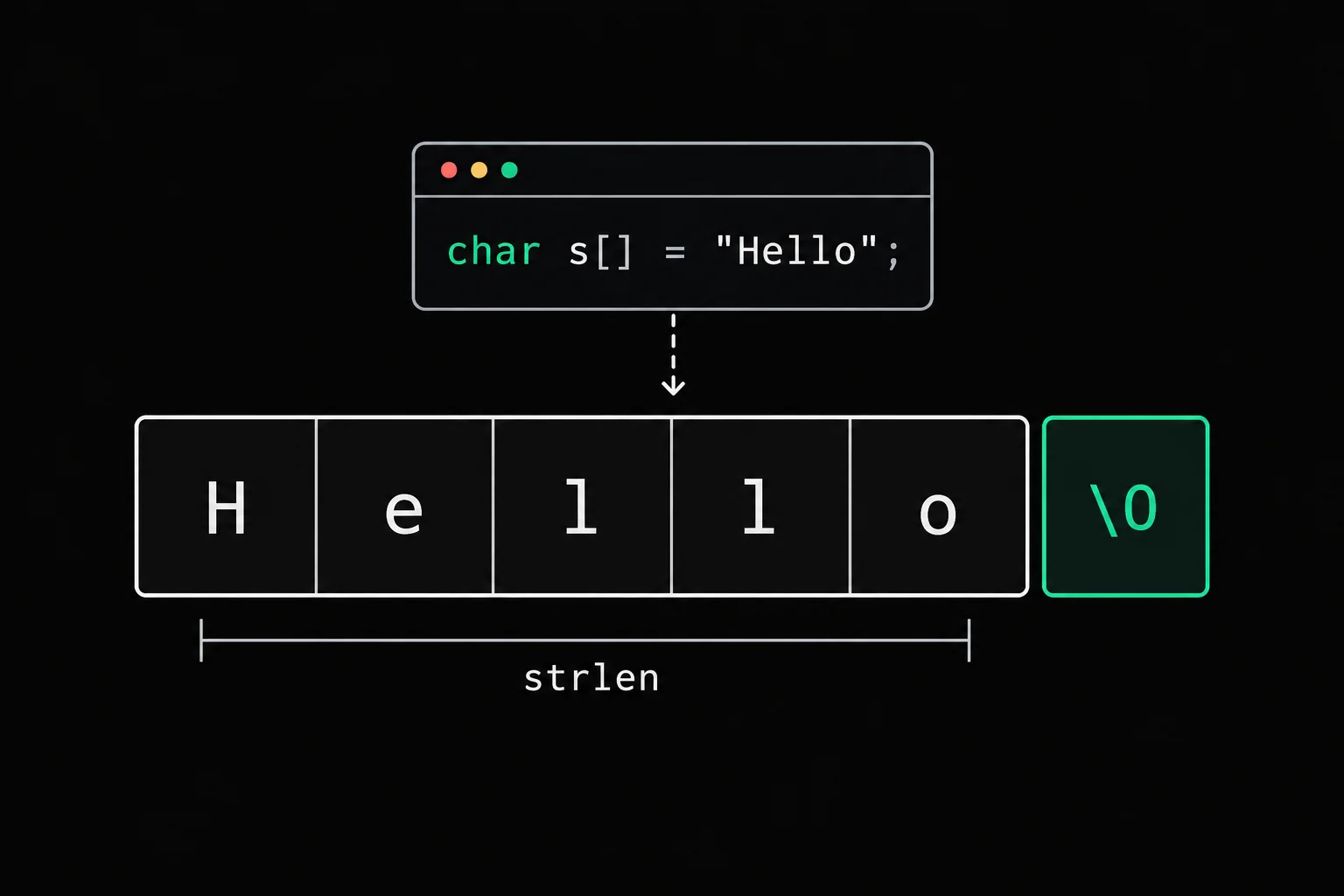
C has no string type. No string, no length stored anywhere: just char values in a row, and a null byte to mark where they stop. Nearly every string pitfall comes from that. strlen has to walk the text to measure it, strcpy doesn't know the size of your destination, and == compares addresses.
In short
A string in C is an array of char terminated by the null character '\0', the byte with value 0. No length is stored: strlen counts the characters up to the '\0', without counting it, so "Rabat" takes 6 bytes for a length of 5. The functions in <string.h> trust that '\0' and the space you give them: strcpy doesn't check the size of the destination, strncpy can leave a string without a terminator, and you compare two strings with strcmp, never with ==.
What is a string in C?
An array of char whose last meaningful element is '\0'. When you write char city[] = "Rabat";, the compiler reserves six bytes, the five letters plus the terminator:
#include <stdio.h>#include <string.h>
int main(void){    char city[] = "Rabat";
printf("strlen: %zu\n", strlen(city)); printf("sizeof: %zu\n", sizeof city); printf("city[5] is %d\n", city[5]); return 0;}$ gcc -Wall -Wextra -g size.c -o size$ ./sizestrlen: 5sizeof: 6city[5] is 0Stack
- char[6]city
- 'R''a''b''a''t''\0'
sizeof measures the array, 6 bytes. strlen(3) measures the text, 5 characters. The sixth byte is really there and holds 0. Don't confuse it with the character '0', which is 48 in ASCII, or with NULL, which is a pointer.
That '\0' is the only landmark string functions have. strlen moves byte by byte until it reaches it; printf("%s") prints everything up to it. If it's missing, they keep going through the memory that follows, until the first null byte they happen to meet. Every bug on this page comes back to that.
strlen doesn't count the '\0'
strlen returns the number of bytes before the terminator, as a size_t that you print with %zu. Hence the + 1 you find in any code that allocates a copy: malloc(strlen(s) + 1). Forget it and the '\0' gets written one byte too far, a mistake that almost never crashes right away.
If you want a close look at what strlen does, strlen has you rewrite it: one loop, one stop condition, and the empty string case.
Why strcpy is dangerous
strcpy(3) copies the source up to and including its '\0', without knowing the size of the destination. The man page says so plainly: providing strlen(src) + 1 bytes is the programmer's job, and otherwise the behavior is undefined. When the source is hard-coded, GCC 15 spots the problem at compile time:
$ gcc -Wall -Wextra -g overflow.c -o overflowoverflow.c: In function 'main':overflow.c:8:5: warning: '__builtin_memcpy' writing 11 bytes into a region of size 8 overflows the destination [-Wstringop-overflow=] 8 | strcpy(city, "Casablanca"); | ^~~~~~~~~~~~~~~~~~~~~~~~~~overflow.c:6:10: note: destination object 'city' of size 8 6 | char city[8]; | ^~~~When the source comes from the user, it sees nothing:
#include <stdio.h>#include <string.h>
int main(int argc, char **argv){    char city[8];
if (argc < 2) return 1; strcpy(city, argv[1]); printf("%s\n", city); return 0;}$ gcc -Wall -Wextra -g copy.c -o copy$ ./copy RabatRabat$ ./copy CasablancaCasablancaNo warning, no crash, and yet 11 bytes were written into an 8-byte array. The last three overwrote whatever came after city on the stack. AddressSanitizer confirms it:
$ gcc -g -fsanitize=address copy.c -o copy-asan$ ./copy-asan Casablanca===================================================================38==ERROR: AddressSanitizer: stack-buffer-overflow on address 0xfbffae500028 at pc 0xffffb0c00f94 bp 0xffffd5b46e60 sp 0xffffd5b46eb0WRITE of size 11 at 0xfbffae500028 thread T0 #0 0xffffb0c00f90 (/usr/local/lib64/libasan.so.8+0x90f90) #1 0x0000004009dc in main /home/student/lab/copy.c:10... This frame has 1 object(s): [32, 40) 'city' (line 6) <== Memory access at offset 40 overflows this variable...SUMMARY: AddressSanitizer: stack-buffer-overflow /home/student/lab/copy.c:10 in mainIf you have ever seen *** buffer overflow detected ***, that is the same bug caught by a different safeguard. With -O2 -D_FORTIFY_SOURCE=2, the glibc headers swap strcpy for a checked version that knows the size of city and stops the program:
$ gcc -O2 -D_FORTIFY_SOURCE=2 copy.c -o copy-fortify$ ./copy-fortify Casablanca*** buffer overflow detected ***: terminatedAbortedTo copy safely, measure before you copy, or let snprintf do the work: it never writes more than the size you give it, terminates the string whenever that size is not zero, and returns the length it would have written, which lets you detect truncation.
#include <stdio.h>
int main(int argc, char **argv){    char city[8];    int n;
if (argc < 2) return 1; n = snprintf(city, sizeof city, "%s", argv[1]); printf("%s\n", city); if (n >= (int)sizeof city) printf("truncated: needed %d bytes\n", n + 1); return 0;}$ ./snp CasablancaCasablatruncated: needed 11 bytesstrncpy doesn't always terminate the string
strncpy(3) is often sold as the safe version of strcpy. It does keep you from overflowing, but it has a trap of its own: if the source is n bytes long or more, it copies exactly n and adds no '\0'. The result is then no longer a string.
#include <stdio.h>#include <string.h>
struct record {    char name[4];    char city[8];};
int main(void){    struct record r = { .city = "Rabat" };
strncpy(r.name, "Yasmine", sizeof r.name); printf("name: %s\n", r.name); return 0;}$ gcc -Wall -Wextra -g truncate.c -o truncatetruncate.c: In function 'main':truncate.c:13:5: warning: 'strncpy' output truncated copying 4 bytes from a string of length 7 [-Wstringop-truncation] 13 | strncpy(r.name, "Yasmine", sizeof r.name); | ^~~~~~~~~~~~~~~~~~~~~~~~~~~~~~~~~~~~~~~~~$ ./truncatename: YasmRabatStack
- char[4]r.name
- 'Y''a''s''m'
- no '\0'
- char[8]r.city
- 'R''a''b''a''t''\0''\0''\0'
printf read the four bytes of name, found no terminator, and carried on into city, the next field in the struct, up to its '\0'. Reading past the end of an array is undefined behavior. The result is predictable here because the two fields sit right next to each other, but with an ordinary variable, printf would print whatever happens to be lying around on the stack.
The opposite holds too: when the source is shorter than n, strncpy fills the whole rest of the destination with '\0'. Copying three letters into a 4,096-byte buffer writes 4,096 bytes.
strncpy(r.name, "Yasmine", sizeof r.name);strncpy(r.name, "Yasmine", sizeof r.name - 1);r.name[sizeof r.name - 1] = '\0';With the second version, the program prints name: Yas and GCC stays quiet. Truncating is still a decision: a cut-off name is sometimes worse than a plain error, and that call is yours to make.

strncpy
Write gm_strncpy with the real strncpy contract: at most n bytes copied, the rest filled with '\0' when the source is shorter, and no terminator when it is longer. The tests print every byte of the destination, including the ones you should not have touched.
Compare two strings: strcmp, not ==
== between two strings compares two addresses, not two texts. GCC flags it with -Wall:
#include <stdio.h>#include <string.h>
int main(void){    char answer[] = "yes";
if (answer == "yes") printf("==: equal\n"); else printf("==: different\n"); if (strcmp(answer, "yes") == 0) printf("strcmp: equal\n"); return 0;}$ gcc -Wall -Wextra -g compare.c -o comparecompare.c: In function 'main':compare.c:8:16: warning: comparison with string literal results in unspecified behavior [-Waddress] 8 | if (answer == "yes") | ^~$ ./compare==: differentstrcmp: equalanswer is an array on the stack, "yes" a string literal stored somewhere else: same bytes, different addresses. strcmp(3) compares the bytes one by one, read as unsigned char, and returns 0 if the two strings are identical, a negative number if the first one sorts first in byte order, and a positive one otherwise. Only the sign matters, not the value. Watch out for if (strcmp(a, b)): it is true when the strings are different. Spell out == 0, it reads better. The strcmp exercise has you write this comparison by hand.
Concatenate with strcat
strcat appends one string to the end of another, overwriting the first one's '\0'. The destination must already be a string and have room for the whole thing, that is strlen(dst) + strlen(src) + 1 bytes:
#include <stdio.h>#include <string.h>
int main(void){    char path[32] = "/home/";
strcat(path, "yasmine"); strcat(path, "/notes.txt"); printf("%s (%zu characters)\n", path, strlen(path)); return 0;}$ ./concat/home/yasmine/notes.txt (23 characters)strcat checks the available space no more than strcpy does. To build a text out of variable pieces, snprintf(path, sizeof path, "/home/%s/notes.txt", name) does the same job in one line, with the size as a guard.
Duplicate with strdup
strdup(3) allocates exactly strlen(s) + 1 bytes with malloc, copies the string into them and returns the pointer. The copy belongs to you: you can modify it, and you must release it with free.
#include <stdio.h>#include <stdlib.h>#include <string.h>
int main(void){    char *copy = strdup("Marrakech");
if (copy == NULL) return 1; copy[0] = 'm'; printf("%s\n", copy); free(copy); return 0;}$ gcc -Wall -Wextra -g dup.c -o dup$ valgrind -q ./dupmarrakechValgrind reports nothing: the block allocated by strdup was given back. For a long time, strdup only existed in POSIX; C23 brought it into the standard. With GCC's default options, or with -std=c23, <string.h> declares it. Force an older strict standard and it disappears:
$ gcc -std=c17 -Wall -Wextra -g dup.c -o dup17dup.c: In function 'main':dup.c:7:18: error: implicit declaration of function 'strdup'; did you mean 'strcmp'? [-Wimplicit-function-declaration] 7 | char *copy = strdup("Marrakech"); | ^~~~~~ | strcmpdup.c:7:18: error: initialization of 'char *' from 'int' makes pointer from integer without a cast [-Wint-conversion]With -std=c17, add #define _POSIX_C_SOURCE 200809L before the first #include, or compile as C23. The message itself is explained in implicit declaration of function.
Read a line with fgets: the \n it keeps
fgets(3) reads a line into an array, never past the size you give it, and always terminates the string. It is the right way to read text typed by the user. One detail surprises everyone the first time: it keeps the \n at the end of the line.
#include <stdio.h>
int main(void){    char name[32];
printf("Name: "); if (fgets(name, sizeof name, stdin) == NULL) return 1; printf("Hello, %s!\n", name); return 0;}$ echo Yasmine | ./nameName: Hello, Yasmine!The \n that was read is part of name, right before the '\0', so the exclamation mark lands on the next line. To get rid of it, overwrite it with a terminator. strcspn(name, "\n") gives the position of the first \n, or the length of the string if there is none, which makes this line safe in both cases:
name[strcspn(name, "\n")] = '\0';$ echo Yasmine | ./name2Name: Hello, Yasmine!bounded_copy_audit
The starter function copy_frame trusts the length the caller announces and writes past its destination. Fix it so that it stops at the first of three limits (the announced length, the end of the source, the capacity minus one) and always terminates the string. Every test runs again under a memory checker: a single byte too many is enough to fail.
The C path dedicates a whole module to these bounded copies, Writing text without overflowing: strcpy, strcat, strncpy and strncat, which you rewrite yourself.
Frequently asked questions
What is the difference between '\0', '0' and NULL?
'\0' is the null character, the byte with value 0 that ends a string. '0' is the digit zero, which is 48 in ASCII. NULL is a pointer that points to nothing: you compare it with a pointer, never with a character.
Why does strlen("café") return 5?
Because strlen counts bytes, not letters. In a UTF-8 source file, "é" takes two bytes. To count the characters of accented text, you have to decode the UTF-8, which <string.h> does not do.
Why doesn't sizeof give the length of my string?
sizeof measures memory, not text. On an array, it gives the capacity, terminator included; on a char *, the size of the pointer, 8 bytes on a 64-bit machine. The difference is covered in detail in Array vs pointer in C.
Can I modify a string declared with char *s = "..."?
No. s then points to a string literal, which the compiler stores as read-only, and writing to it crashes on Linux with a segmentation fault. Declare an array, char s[] = "...", or make a copy with strdup.
How do I know whether strncpy truncated my string?
Not from its return value: the man page states that truncation cannot be detected from what strncpy returns. Compare strlen(src) with the size of the destination before copying, or use snprintf, whose return value gives the full length.
Sources