Pointers in C explained with memory diagrams
Pointers in C explained with memory diagrams: addresses, & and *, swap, arrays, the NULL pointer, pointers to pointers and function pointers.
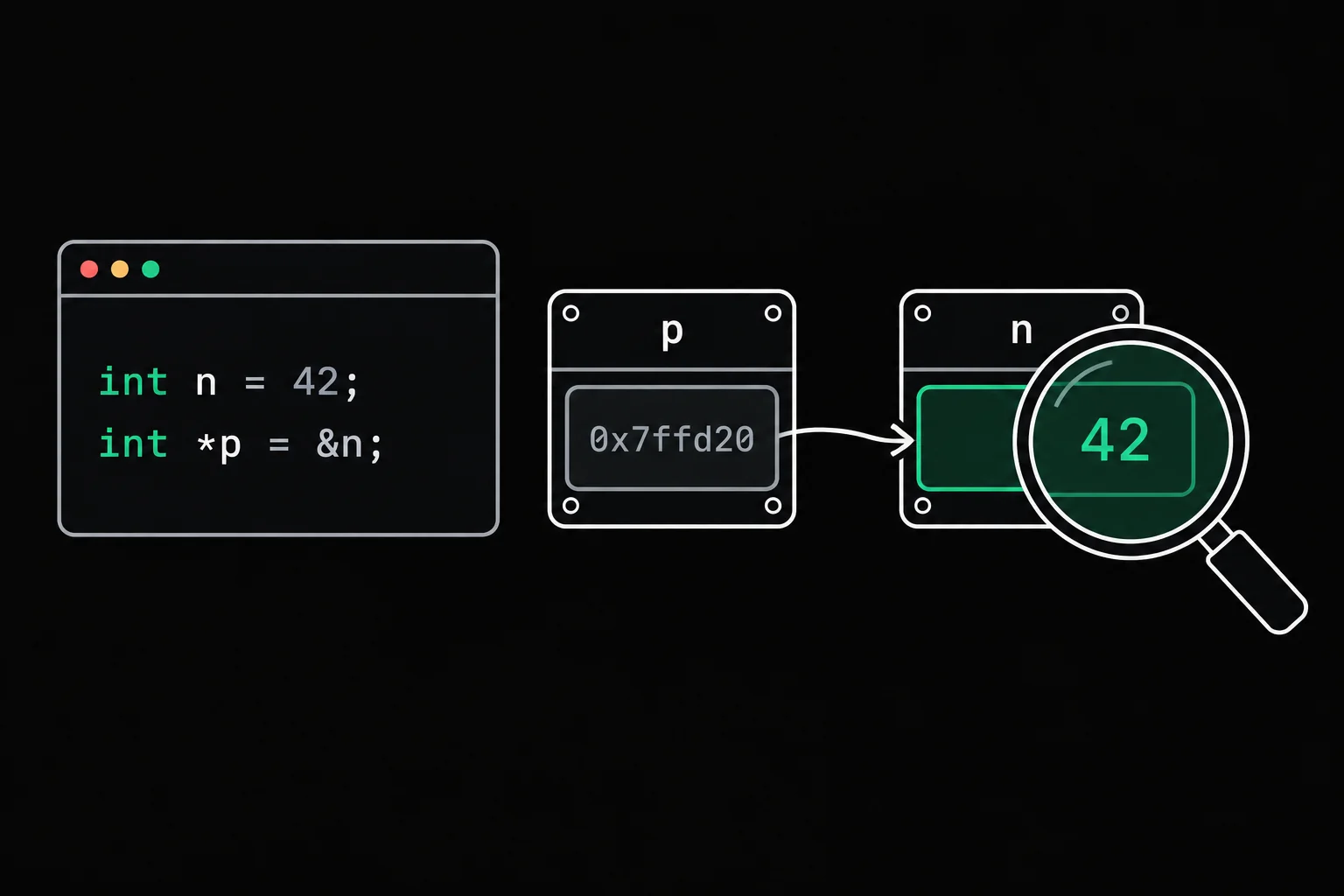
You read int *p = &n;, then *p = 7; three lines further down, and the star doesn't seem to mean the same thing in both places. That's because it doesn't. Pointers get simple as soon as you look at what is actually in memory, so that's what we'll do here, with addresses printed by the programs themselves.
In short
A pointer is a variable that holds the address of another variable. &n gives the address of n, and *p is the variable whose address p holds, so writing *p = 7 changes n. Pointers let a function modify the caller's variables, walk through an array and handle memory allocated with malloc. A pointer that points to nothing is NULL, and dereferencing it is undefined behavior that most often ends in a segmentation fault.
What is a pointer in C?
A pointer is a variable whose value is a memory address. Every variable in your program takes up a few bytes somewhere in memory, and each of those bytes has a number: its address. An int usually takes 4 bytes, and the variable's address is the address of the first one.
The clearest way to see it is to print them. printf's %p format prints an address; the standard requires a void * for it, hence the (void *) conversion in front of each argument.
#include <stdio.h>
int main(void){    int n = 42;    int *p = &n;
    printf("n is %d\n", n);    printf("n is stored at address %p\n", (void *)&n);    printf("p holds %p\n", (void *)p);    printf("*p is %d\n", *p);
*p = 7; printf("after *p = 7, n is %d\n", n); printf("size of n: %zu bytes, size of p: %zu bytes\n", sizeof n, sizeof p); return 0;}$ gcc -Wall -Wextra -g address.c -o address$ ./addressn is 42n is stored at address 0xfffff018c844p holds 0xfffff018c844*p is 42after *p = 7, n is 7size of n: 4 bytes, size of p: 8 bytes$ ./addressn is 42n is stored at address 0xfffffa560ba4p holds 0xfffffa560ba4*p is 42after *p = 7, n is 7size of n: 4 bytes, size of p: 8 bytesThere are three things to read in this output. p holds exactly the address of n: that's all a pointer is. Changing *p changed n, because *p is n, reached through its address. And the address changes from one run to the next: Linux puts the stack at a random place on every launch (address space layout randomization). So your code must never depend on the value of an address, only on what it points to.
On this 64-bit machine, a pointer takes 8 bytes, whatever the size of what it points to. Here is memory right after the line int *p = &n;:
Stack
- intnn
- 42
- stored at address 0xfffff018c844
- int *p
- 0xfffff018c844n
And right after *p = 7;. The pointer keeps the same value; only the variable it points to has changed:
Stack
- intnn
- 7
- int *p
- 0xfffff018c844n
Reading & and * without mixing them up
Where pointers are concerned, the star has two jobs depending on where it appears (not counting multiplication). In a declaration, it announces a pointer: int *p declares a variable p of type "pointer to int". In an expression, it's the indirection operator: *p is the object whose address p holds. The ampersand & in front of a variable takes its address; between two operands, a & b, it's bitwise AND, which is another story.
| Expression | Read it as | In address.c |
|---|---|---|
int *p; | p is a pointer to an int | a declaration, no value printed |
&n | the address of n | 0xfffff018c844 |
p | the address stored in p | 0xfffff018c844 |
*p | the int stored at that address | 42, then 7 |
p = &n | p now points to n | changes the pointer |
*p = 7 | the int pointed to gets 7 | changes n |
One reading trap: in int *p, q;, only p is a pointer, and q is a plain int. The star belongs to the name it precedes, not to every name on the line. One declaration per line makes the question go away.
What are pointers used for?
The first use is letting a function modify a variable that belongs to someone else. In C, every argument is passed by value: the function receives a copy. The program below believes it swaps x and y, and it prints the addresses so you can see where the copies live.
#include <stdio.h>
void swap(int a, int b){    int tmp = a;
    printf("in swap: &a = %p, &b = %p\n", (void *)&a, (void *)&b);    a = b;    b = tmp;}
int main(void){    int x = 1;    int y = 2;
printf("in main: &x = %p, &y = %p\n", (void *)&x, (void *)&y); swap(x, y); printf("x = %d, y = %d\n", x, y); return 0;}$ gcc -Wall -Wextra -g copy.c -o copy$ ./copyin main: &x = 0xffffc45710cc, &y = 0xffffc45710c8in swap: &a = 0xffffc457109c, &b = 0xffffc4571098x = 1, y = 2a and b live at different addresses from x and y. The swap did happen, but between the copies, which vanish at the return. Just before swap ends, the stack looks like this:
Stack
- intx
- 1
- at 0xffffc45710cc
- inty
- 2
- at 0xffffc45710c8
- inta
- 2
- at 0xffffc457109c, a copy of x
- intb
- 1
- at 0xffffc4571098, a copy of y
- inttmp
- 1
The fix: pass swap the addresses of x and y, and work through them.
void swap(int a, int b){    int tmp = a;
a = b; b = tmp;}/* call: swap(x, y); */void swap(int *a, int *b){ int tmp = *a;
*a = *b; *b = tmp;}/* call: swap(&x, &y); */#include <stdio.h>
void swap(int *a, int *b){ int tmp = *a;
*a = *b; *b = tmp;}
int main(void){ int x = 1; int y = 2;
swap(&x, &y); printf("x = %d, y = %d\n", x, y); return 0;}$ gcc -Wall -Wextra -g swap.c -o swap$ ./swapx = 2, y = 1a and b are still copies, but copies of addresses: they point to the real variables in main.
Stack
- intxx
- 2
- intyy
- 1
- int *a
- x
- int *b
- y
- inttmp
- 1

swap_int
Write swap_int, which receives the addresses of two integers and swaps the values stored there, using a temporary variable. The tests call swap_int(&x, &y) with values such as 7 and 99, then check that x and y really were swapped in the caller.
The same mechanism explains why scanf(3) wants &age and not age: it has to write into your variable, so it needs its address. It also lets a function hand back several results, by writing each one to an address the caller provides.
div_mod_floor
One function, two results: div_mod_floor writes the quotient through q and the remainder through r. The pointers are the easy part; the real work is keeping the remainder from ever going negative while C's / truncates toward zero (-7 / 2 is -3, and the expected answer is -4 remainder 1).
Pointer arithmetic on an array
Adding 1 to a pointer moves it forward by one element, not by one byte. If p points to scores[0], then p + 1 points to scores[1], four bytes further on when the elements are ints. The standard in fact defines t[i] as another way of writing *(t + i).
#include <stdio.h>
int main(void){    int scores[4] = {12, 15, 9, 18};    int *p = scores;
for (int i = 0; i < 4; i++) printf("p + %d = %p, *(p + %d) = %d\n", i, (void *)(p + i), i, *(p + i)); printf("distance in bytes between p + 1 and p: %td\n", (char *)(p + 1) - (char *)p); printf("distance in elements between &scores[3] and p: %td\n", &scores[3] - p); return 0;}$ gcc -Wall -Wextra -g array.c -o array$ ./arrayp + 0 = 0xffffe5b04320, *(p + 0) = 12p + 1 = 0xffffe5b04324, *(p + 1) = 15p + 2 = 0xffffe5b04328, *(p + 2) = 9p + 3 = 0xffffe5b0432c, *(p + 3) = 18distance in bytes between p + 1 and p: 4distance in elements between &scores[3] and p: 3The addresses go up 4 at a time (20, 24, 28, 2c in hexadecimal): the compiler multiplies by sizeof(int) on its own. The other way round, the difference between two pointers counts elements, not bytes, and its type is ptrdiff_t, which prints with %td. In memory:
Stack
- int[4]scoresscores
- 1215918
- int *p
- 0xffffe5b04320scores
- p + 2 is 0xffffe5b04328, the address of scores[2]
One limit to know: a pointer may range from the first element up to the slot just past the last one, but no further, and that "one past the end" slot must never be dereferenced, for reading or for writing. Leaving that range is undefined behavior, even without a read. None of this makes an array a pointer (sizeof tells them apart, for one): the full difference is in array vs pointer in C.
The NULL pointer
NULL is the value you give a pointer that points to nothing. The standard guarantees that a null pointer compares unequal to the address of any object, which makes it a safe way to say "no result". malloc returns NULL when it couldn't allocate, fopen when it couldn't open the file, and your own functions can follow the same convention:
#include <stdio.h>
int *find(int *t, int size, int target){    for (int i = 0; i < size; i++)        if (t[i] == target)            return &t[i];    return NULL;}
int main(void){    int scores[4] = {12, 15, 9, 18};    int *r = find(scores, 4, 9);
if (r != NULL) printf("found 9 at index %td\n", r - scores); r = find(scores, 4, 20); if (r == NULL) printf("20 missing: find returned %p\n", (void *)r); return 0;}$ gcc -Wall -Wextra -g null.c -o null$ ./nullfound 9 at index 220 missing: find returned (nil)glibc prints a null pointer as (nil); the standard leaves that format up to each library. The rule to remember: test a pointer before dereferencing it whenever it comes from a function that can fail. Reading *r when r is NULL is undefined behavior, which on Linux usually shows up as an immediate Segmentation fault. How to track down the faulty line is covered in Segmentation fault in C.
Since C23, the standard also has nullptr, a null pointer constant with a type of its own. GCC 15 compiles as C23 by default, so int *r = nullptr; works there with no extra option. NULL still works everywhere. The Grademe grader compiles exercises with -std=gnu17, where nullptr doesn't exist, so in exercises, write NULL.
Pointer to pointer: int **
A pointer is a variable like any other: it has an address too, and that address can go in a pointer to a pointer.
#include <stdio.h>
int main(void){    int n = 42;    int *p = &n;    int **pp = &p;
printf("&n = %p\n", (void *)&n); printf("p = %p\n", (void *)p); printf("&p = %p\n", (void *)&p); printf("pp = %p\n", (void *)pp); printf("*pp = %p\n", (void *)*pp); printf("**pp = %d\n", **pp); return 0;}$ gcc -Wall -Wextra -g double.c -o double$ ./double&n = 0xffffe7fc5c04p = 0xffffe7fc5c04&p = 0xffffe7fc5bf8pp = 0xffffe7fc5bf8*pp = 0xffffe7fc5c04**pp = 42Each star is one hop: *pp follows the first arrow and gives p, **pp follows the second and gives n.
Stack
- intnn
- 42
- int *pp
- 0xffffe7fc5c04n
- int **pp
- 0xffffe7fc5bf8p
What's the point? It's the swap problem, one level up. For a function to modify an int that belongs to the caller, it needs an int *. For it to modify an int * that belongs to the caller, for instance to hand over an array it has just allocated, it needs an int **.
#include <stdio.h>#include <stdlib.h>
int make_array(int **out, int size){    int *t = malloc(size * sizeof *t);
    if (t == NULL)        return -1;    for (int i = 0; i < size; i++)        t[i] = i * i;    *out = t;    return 0;}
int main(void){    int *squares = NULL;
if (make_array(&squares, 4) != 0) return 1; printf("%d %d %d %d\n", squares[0], squares[1], squares[2], squares[3]); free(squares); return 0;}$ gcc -Wall -Wextra -g pp.c -o pp$ ./pp0 1 4 9$ valgrind -q --leak-check=full ./pp0 1 4 9With -q, Valgrind prints only errors, and --leak-check=full counts every leak as one: it has nothing to report, so free did give the block back. Right after line 12, memory looks like this:
Stack
- int *squaressquares
- tab
- int **out
- squares
- intsize
- 4
- int *t
- tab
Heap
The block lives on the heap, so it survives the return from make_array, unlike t, which disappears along with the function. The difference between those two areas is the subject of stack vs heap in C. You'll meet ** in other places too: char **argv in main, and every function that changes the head of a linked list.
Function pointers, briefly
A function has an address too, and a pointer can hold it. You then call it exactly as you would the function.
#include <stdio.h>
int sum(int a, int b) { return a + b; }int product(int a, int b) { return a * b; }
int main(void){    int (*op)(int, int) = sum;
printf("%d\n", op(6, 7)); op = product; printf("%d\n", op(6, 7)); return 0;}$ gcc -Wall -Wextra -g function.c -o function$ ./function1342Read the declaration from the inside out: (*op) is a pointer, (int, int) to a function that takes two ints, and the int at the start is what that function returns. The parentheses around *op are required: without them, int *op(int, int); declares a function that returns an int *. The most common use is handing a behavior to another function, like the comparison function qsort receives so it can sort any array, or the operation list_apply applies to every node of a list.
Common pointer mistakes
The most frequent one is using a pointer before giving it a target. An uninitialized local pointer holds an address nobody chose.
#include <stdio.h>
int main(void){    int *p;
*p = 3; printf("%d\n", *p); return 0;}$ gcc -Wall -Wextra -g noninit.c -o noninitnoninit.c: In function 'main':noninit.c:7:8: warning: 'p' is used uninitialized [-Wuninitialized] 7 | *p = 3; | ~~~^~~noninit.c:5:10: note: 'p' was declared here 5 | int *p; | ^$ ./noninitSegmentation faultStack
- int *p
- ? indeterminate
Here the program crashes, which is the best possible outcome. Had the random address landed in an accessible area, *p = 3 would have overwritten some other variable without a sound.
The other classic mistakes are variations on the same problem, an address that no longer points to anything valid: returning the address of a local variable, using a block after free, running off the end of an array. They're covered, with gdb and Valgrind output, in Segmentation fault in C.
The Grademe visualizer runs a C program line by line and draws the stack, the heap and the pointer arrows at every step: the "Visualize" buttons on the programs above open it directly. To practice in order, the C path module on pointers works through addresses, indirection, output parameters and ranges.
Frequently asked questions
How big is a pointer in C?
On common 64-bit systems (Linux, macOS or Windows on x86_64 and ARM64), a pointer takes 8 bytes, whatever type it points to: sizeof(int *) and sizeof(char *) are both 8. On a 32-bit system, it's 4 bytes. sizeof p gives you the answer on your machine.
Why write (void *) in printf("%p")?
Because the standard requires %p to receive a pointer to void (or, since C23, to a character type). Passing an int * without the conversion works on most machines but steps outside what the standard guarantees. -Wall says nothing, -Wpedantic reports it: format '%p' expects argument of type 'void *', but argument 2 has type 'int *'.
What's the difference between NULL, 0 and nullptr?
All three give a null pointer when you assign them to a pointer. 0 is an integer constant that the standard accepts as a null pointer constant, NULL is a macro defined by the standard headers, and nullptr, added in C23, has its own type, so it can't be mistaken for an integer. Write NULL (or nullptr in C23), never 0, so that anyone reading sees it's a pointer.
Why does the printed address change on every run?
Because Linux randomizes where the stack, the heap and the libraries go each time a program starts (that's the kernel's randomize_va_space setting). Your program must never depend on the numeric value of an address.
Is an array a pointer?
No. In most expressions, an array's name converts to a pointer to its first element, hence the confusion, but sizeof on an array gives its total size, and you can't assign to an array. The details are in array vs pointer in C.
Sources