undefined reference to in C: fixing the linker error
Your code compiles but ld fails: misspelled main, forgotten .c file, missing -lm, wrong -l order, multiple definition. Each case reproduced with GCC and nm.
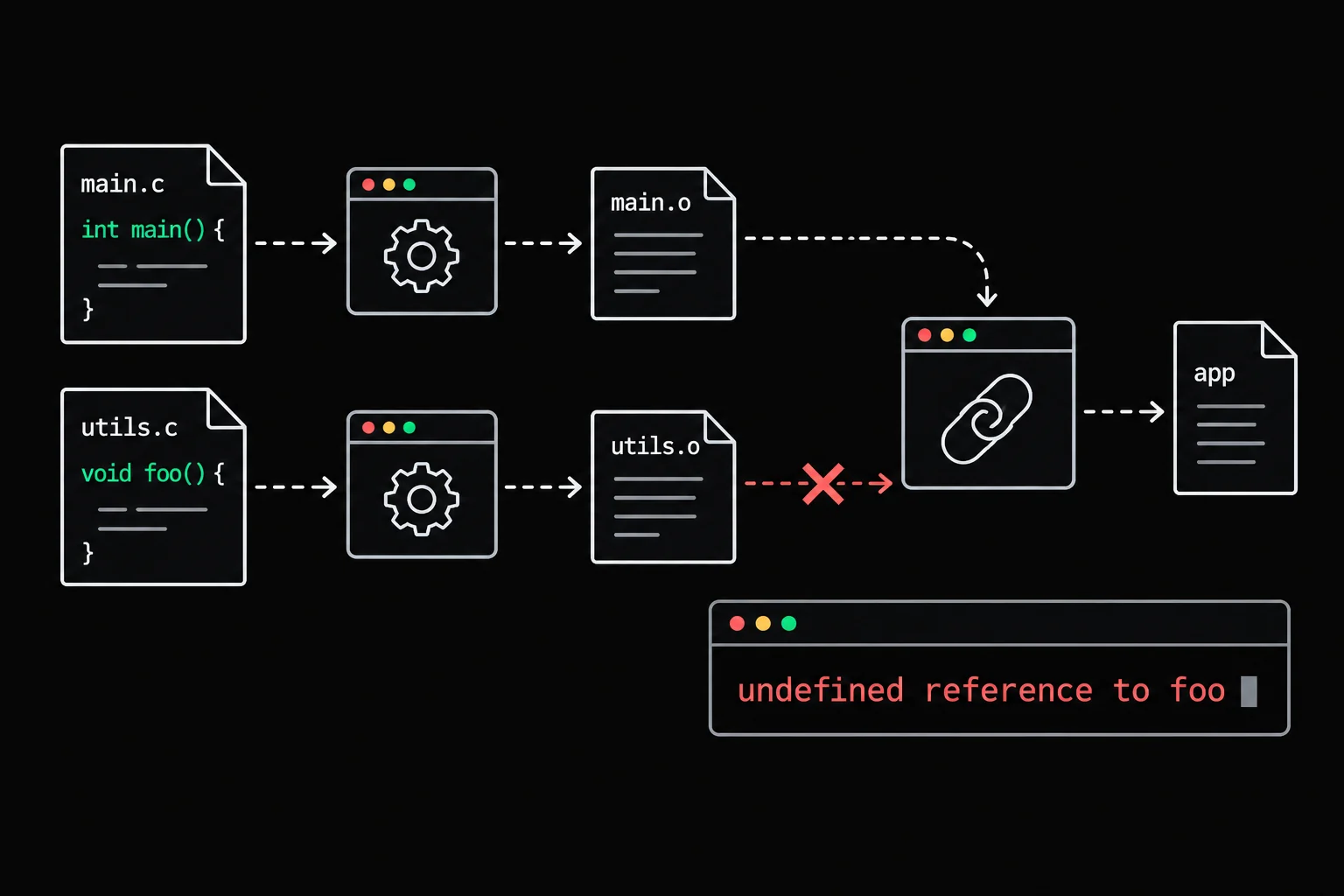
No line number, a file called /tmp/ccQVslct.o that you never created, and a last line about collect2 and ld. This message looks nothing like the usual compile errors because it does not come from the compiler. It comes from the stage after it, and once you know which stage, the cause is quick to find.
In short
undefined reference to `x' is a linker (ld) error: every file compiled, but when the executable is put together, none of them provides the symbol x. The usual causes are a missing or misspelled main, a .c file left out of the command, a function declared but never defined (or defined under another name), and a library that is not linked, such as -lm for sqrt, or that is placed before the files that use it. collect2: error: ld returned 1 exit status is only the closing line: the cause is in the lines above it.
Compiling or linking: which stage fails?
gcc main.c -o main runs four stages in a row, and only the last one needs to see the whole program at once. The preprocessor pastes in the contents of the #includes, the compiler translates your C into assembly, the assembler turns that into an object file .o, then the linker combines the .o files and the libraries into an executable.
- main.cyour source code
- main.i#include and macros expanded
- main.sassembly
- main.omachine code, calls still pending
- mainevery call must find its function
An object file holds the code of your functions, plus the list of names it uses without defining them. For main.o, those are the functions called from main. As long as you work one file at a time, these holes are allowed: a prototype is enough to compile a call to a function defined elsewhere. At link time, every hole has to be filled by another file or by a library.
You can watch it happen by splitting the stages, on a two-file program: main.c calls square, which is declared in calc.h and defined in calc.c. gcc -c stops at the object file, without linking:
$ gcc -Wall -Wextra -c main.c$ lscalc.c calc.h main.c main.o$ gcc main.o -o main/usr/bin/ld: main.o: in function `main':main.c:(.text+0xc): undefined reference to `square'collect2: error: ld returned 1 exit status$ gcc -Wall -Wextra -c calc.c$ gcc main.o calc.o -o main && ./main49Compiling main.c reported nothing: the call was correct. The error shows up when you ask for the executable without calc.o. When you compile in a single command, GCC does the same thing with temporary object files, hence names like /tmp/cckW0oZp.o. And collect2 is the program GCC runs instead of ld for this last stage: it calls the real ld and passes its failure on.
undefined reference to `main'
The program has no main function, or it goes by another name. One letter is enough:
#include <stdio.h>
int mian(void){ printf("Hello\n"); return 0;}$ gcc -Wall -Wextra mian.c -o mian/usr/bin/ld: /lib/aarch64-linux-gnu/crt1.o: in function `__wrap_main':(.text+0x38): undefined reference to `main'collect2: error: ld returned 1 exit statusThe file blamed here is crt1.o, which you did not write: it is the startup code shipped with the C library, which sets up the process and then calls main. Its function name and path vary from one system to another (the output above comes from a 64-bit ARM machine), but the message undefined reference to `main' stays the same.
The other common case: you compile, on its own, a file that only contains functions and no main, just to check that it compiles. Add -c and GCC stops at the .o without asking for a main.
Forgotten file or function never defined
Back to the opening example: main.c calls square, declared in calc.h and defined in calc.c, but this time everything is compiled in one command.
#include <stdio.h>#include "calc.h"
int main(void){ printf("%d\n", square(7)); return 0;}$ gcc -Wall -Wextra main.c -o main/usr/bin/ld: /tmp/ccQVslct.o: in function `main':main.c:(.text+0xc): undefined reference to `square'collect2: error: ld returned 1 exit status$ gcc -Wall -Wextra main.c calc.c -o main && ./main49An #include "calc.h" only adds declarations. It promises the compiler that square exists somewhere; it does not say where. Every .c file of the program must appear in the command, or in the Makefile that writes the command for you (see writing a Makefile in C).
You get the same message if calc.c is there but the definition has another name: squre instead of square. The compiler cannot see a thing, since each file is correct on its own. This is where a tool that reads object files comes in handy.
Reading symbols with nm
nm(1) lists the symbols of an object file. T marks a function defined in that file, U a symbol used here but defined elsewhere. Linking succeeds when every U finds a T in another file or a library.
$ gcc -c main.c calc.c$ nm main.o calc.omain.o:0000000000000000 T main                 U printf                 U square
calc.o:0000000000000000 T squre
The diagnosis is immediate: main.o expects square, and calc.o provides squre. printf is a U as well, but the C library, which is linked by default, provides it.
To have the compiler catch this kind of typo, add -Wmissing-prototypes: it flags any global function defined without a visible prototype, which is exactly what happens when the name in the definition does not match the one in the .h.
$ gcc -Wall -Wextra -Wmissing-prototypes -c calc.ccalc.c:3:5: warning: no previous prototype for 'squre' [-Wmissing-prototypes] 3 | int squre(int n) | ^~~~~undefined reference to `sqrt': the math library
With glibc, the functions of <math.h> live in a separate library, libm, which GCC does not link by default. The following program reads a number and prints its square root:
#include <math.h>#include <stdio.h>
int main(void){    double x;
if (scanf("%lf", &x) != 1) return 1; printf("%.3f\n", sqrt(x)); return 0;}$ gcc -Wall -Wextra root.c -o root/usr/bin/ld: /tmp/ccfiSS3M.o: in function `main':root.c:(.text+0x34): undefined reference to `sqrt'collect2: error: ld returned 1 exit status$ gcc -Wall -Wextra root.c -o root -lm && echo 2 | ./root1.414-lm tells the linker to search libm. The LIBRARY section of each man page says which library to add: for sqrt, it says Math library (libm, -lm). You can also check with nm -D, which lists the symbols a shared library exports (the path depends on the architecture):
$ nm -D /lib/aarch64-linux-gnu/libm.so.6 | grep -w sqrt0000000000013840 W sqrt@@GLIBC_2.17$ nm -D /lib/aarch64-linux-gnu/libc.so.6 | grep -w sqrtsqrt is in libm, not in libc: the second command finds nothing.
Now the trap that makes you doubt everything: with a constant, the error goes away.
$ gcc -Wall -Wextra root_const.c -o root_const && ./root_const1.414This program prints sqrt(2.0). GCC computes the value at compile time, even without optimization, and the call to sqrt disappears from the object file: there is nothing left to look up in libm. The day the argument comes from user input, the error comes back. For an example that really reproduces the problem, the value has to be read at run time, as in root.c.
Why the order of -l flags matters
The linker reads the command from left to right. When it reaches a static library (.a), it only pulls out the functions requested by what it has already read, and it never goes back. A library placed before the file that uses it is therefore useless:
$ gcc -c calc.c$ ar rcs libcalc.a calc.o$ gcc -L. -lcalc main.c -o main/usr/bin/ld: /tmp/cckW0oZp.o: in function `main':main.c:(.text+0xc): undefined reference to `square'collect2: error: ld returned 1 exit status$ gcc main.c -L. -lcalc -o main && ./main49-L. adds the current directory to the places the linker searches, and -lcalc means libcalc.a. With a shared library such as libm.so, the Debian system used here accepts both orders. That stops being true when the linker runs with the --as-needed option, which only keeps a shared library if a file read before it needs it. You do not always know how the linker is configured on the machine that will build your code; -Wl, lets you pass the option by hand to see the difference:
$ gcc -Wl,--as-needed -lm root.c -o root/usr/bin/ld: /tmp/ccVnhEL8.o: in function `main':root.c:(.text+0x34): undefined reference to `sqrt'collect2: error: ld returned 1 exit status$ gcc -Wl,--as-needed root.c -lm -o root && echo 2 | ./root1.414The rule that works everywhere: source and object files first, -l flags at the end of the command, and when one library calls another, it comes before it: -lA -lB when A uses B.
multiple definition of: the opposite problem
multiple definition of `x' means that two object files define the same symbol, and the linker cannot tell which one to keep. The classic cause is a global variable defined in a header:
int counter = 0;
void increment(void);
Included by both main.c and counter.c, this header creates two counter variables, one in each object file:
$ gcc -Wall -Wextra main.c counter.c -o main/usr/bin/ld: /tmp/ccWUV5aq.o:(.bss+0x0): multiple definition of `counter'; /tmp/ccQHNIBe.o:(.bss+0x0): first defined herecollect2: error: ld returned 1 exit status$ gcc -c main.c counter.c$ nm main.o counter.omain.o:0000000000000000 B counter                 U increment0000000000000000 T main                 U printf
counter.o:0000000000000000 B counter0000000000000000 T increment
B means "defined, in the section for zero-initialized variables". Two B counter: two definitions. The same message appears without the = 0, with a bare int counter; in the header, because GCC 10 changed the default behavior (-fno-common). The fix is the same in both cases: the header declares the variable with extern, and a single .c file defines it.
int counter = 0;
void increment(void);extern int counter;
void increment(void);Then, in counter.c, the line int counter = 0; outside any function. nm main.o now shows U counter: main.o uses the variable, counter.o provides it. A function follows the same logic: the prototype in the .h, the body in a single .c.

header_guard
counter.h declares a type and three functions, and Grademe includes it twice in the same file. Protect the header with an include guard, then write the three definitions in counter.c: declarations in the .h, code in a single .c, the split that keeps multiple definition away.
The C path module on headers goes further, all the way to the opaque type whose fields stay hidden in a single .c:
Frequently asked questions
Why doesn't the message give a line number?
Because the linker works on object files, where there are no lines anymore, only offsets such as .text+0x34. Compile with -g and it finds the file and line of the call through the debug information.
I included <math.h>, so why do I still need -lm?
The header declares sqrt; it does not contain its code. That code lives in libm, and with glibc, GCC only links it if you write -lm, at the end of the command.
In a Grademe exercise terminal, sqrt works without -lm. Why?
Exercises run on Alpine, with the musl C library, which keeps the math functions in the C library itself: nm -D /usr/lib/libc.so | grep -w sqrt prints T sqrt there. -lm is still accepted. Keep it in your commands: you need it as soon as you compile against glibc, on Ubuntu, Debian or WSL.
What does "collect2: error: ld returned 1 exit status" mean on its own?
Nothing more than "linking failed". ld exited with status 1, and collect2, the intermediary GCC runs for this stage, reports it. The real error is always above it: undefined reference, multiple definition or cannot find -l....
Sources