fgets after scanf in C: why it skips a line
Does fgets get skipped after scanf? Track the leftover newline in stdin, fix mixed input, and validate a whole number with fgets and strtol.
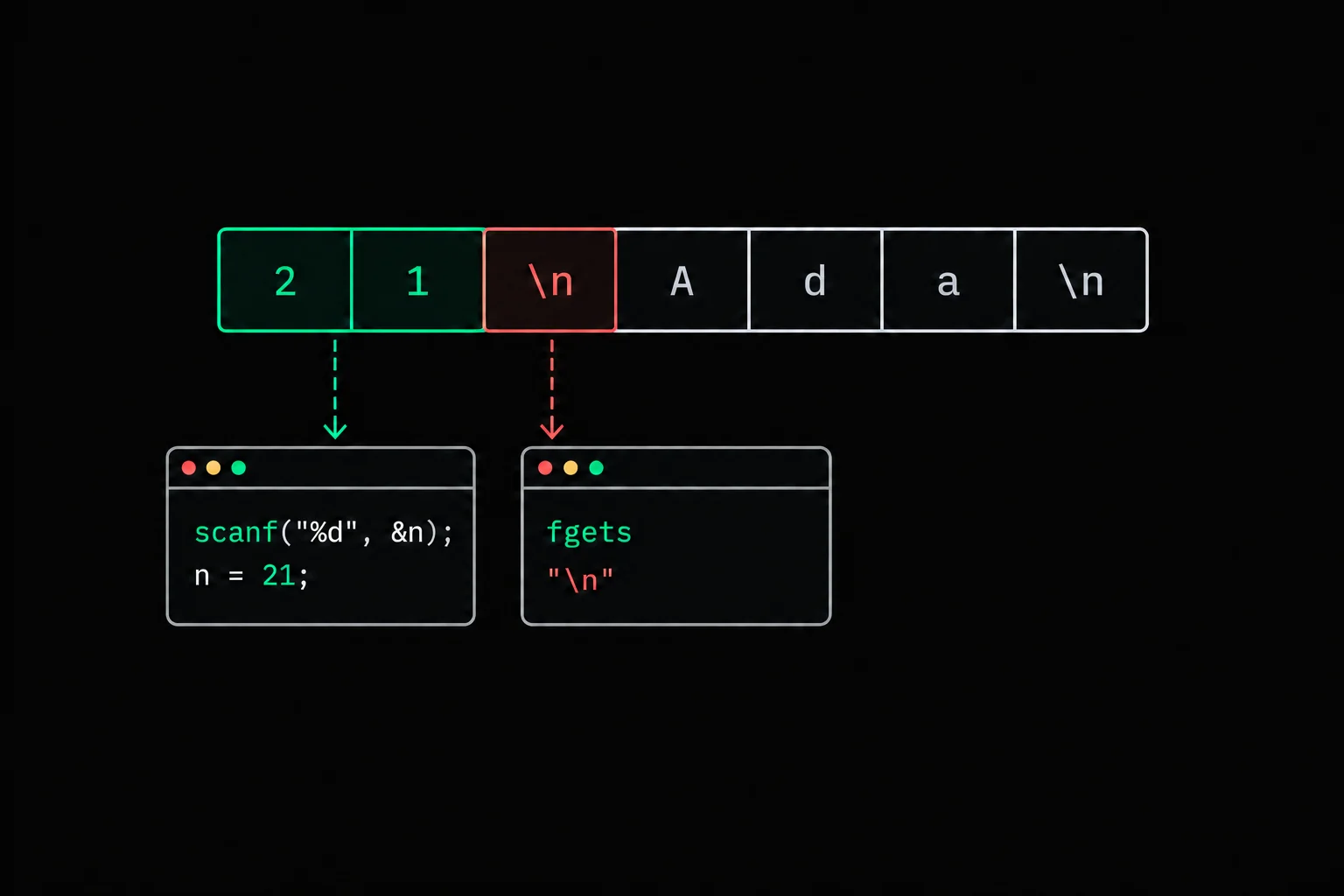
You enter an age, press Enter, and your program prints an empty name without waiting for the next answer. It looks as though the fgets after scanf was skipped. It did read something.
In short
After scanf("%d", &age), the newline following the number remains in stdin. The next fgets reads it and returns the string "\n" without waiting for the name. Consume the rest of the line after scanf, or read each answer with fgets and then convert the number with strtol.
Why does fgets read an empty name after scanf?
Both functions read from the same input stream, but they stop at different points. This small program exposes the problem:
#include <stdio.h>#include <string.h>
int main(void){    int age;    char name[64];
if (scanf("%d", &age) != 1) return 1; if (fgets(name, sizeof name, stdin) == NULL) return 1; name[strcspn(name, "\n")] = '\0'; printf("age=%d, name=[%s]\n", age, name); return 0;}$ gcc -std=c17 -Wall -Wextra -Werror mixed.c -o mixed$ printf '21\nAda\n' | ./mixedage=21, name=[]The shell's printf sends two lines into the program: the bytes 21\nAda\n. That command supplies input; the C program's printf displays the result.
scanf reads the digits 2 and 1, then stops before the first character that no longer belongs to the integer. The newline is still waiting in stdin. fgets consumes it and immediately stops. Next, strcspn locates that \n and the program replaces it with \0, leaving an empty name between the brackets. It hasn't read Ada.
- 21\nAda\nThe two input lines
- \nAda\nscanf consumed 21
- Ada\nfgets consumed the first newline
Keep the scanf(...) != 1 check. If you enter abc, no conversion succeeds. Using age without checking the result would read an uninitialized variable in this program.
How do you fix a program that already uses scanf?
After a successful conversion, read until the next \n or EOF, then call fgets. This fits an input format that puts the age on one line and the name on the next.
#include <stdio.h>#include <string.h>
int main(void){    int age;    char name[64];
if (scanf("%d", &age) != 1) return 1; int c; while ((c = getchar()) != '\n' && c != EOF) ; if (c == EOF) return 1; if (fgets(name, sizeof name, stdin) == NULL) return 1; name[strcspn(name, "\n")] = '\0'; printf("age=%d, name=[%s]\n", age, name); return 0;}$ gcc -std=c17 -Wall -Wextra -Werror discard.c -o discard$ printf '21 \nAda Lovelace\n' | ./discardage=21, name=[Ada Lovelace]Why use a loop instead of one getchar()? A user can type spaces after the number. A single call would remove the first space from 21 \n and leave the rest for fgets.
Declare c as int so it can hold both byte values and the special value EOF. Without the end-of-input check, a loop waiting for \n can run forever on an exhausted file.
This fix deliberately discards everything after the integer on its line. Given 21abc, it keeps age 21 and throws away abc. Rejecting that input requires checking the whole line. There is another limit: %d requires the converted number to fit in an int; conversion overflow is undefined behavior. For uncontrolled input, use the fgets and strtol version below.
How do you use fgets for every answer and validate the number?
Read a complete line first, then pass its string to strtol(3). That lets you reject abc, an oversized number, or 21abc before reading the name.
This program accepts an age from 0 through INT_MAX, with optional surrounding whitespace. Its input format requires each line to end in \n and contain at most 62 bytes before that newline. A longer or incomplete line stops the program.
#include <ctype.h>#include <errno.h>#include <limits.h>#include <stdio.h>#include <stdlib.h>#include <string.h>
static int read_line(char line[64]){    if (fgets(line, 64, stdin) == NULL)        return 0;    char *newline = strchr(line, '\n');    if (newline == NULL)        return 0;    *newline = '\0';    return 1;}
int main(void){    char line[64];    char name[64];    char *end;
if (!read_line(line)) { puts("Invalid age line"); return 1; } errno = 0; long age = strtol(line, &end, 10); if (end == line || errno == ERANGE || age < 0 || age > INT_MAX) { puts("Invalid age"); return 1; } while (isspace((unsigned char)*end)) end++; if (*end != '\0') { puts("Invalid age"); return 1; } if (!read_line(name)) { puts("Invalid name line"); return 1; } printf("age=%ld, name=[%s]\n", age, name); return 0;}$ gcc -std=c17 -Wall -Wextra -Werror read.c -o read$ printf '21\nAda Lovelace\n' | ./readage=21, name=[Ada Lovelace]$ printf '21abc\nAda\n' | ./readInvalid age$ printf 'abc\nAda\n' | ./readInvalid age$ printf '999999999999999999999999\nAda\n' | ./readInvalid age$ printf '21\nAda' | ./readInvalid name lineEach check catches a different failure. end == line means no digits were converted. errno == ERANGE detects a result outside the range of long; the comparison against INT_MAX then applies the chosen age limit. Finally, *end rejects any characters left after trailing whitespace.
The (unsigned char) cast keeps the call to isspace valid when plain char is signed and the string contains a byte above 127. Passing a negative value other than EOF to this function is undefined behavior.
The read_line helper applies the same rule to both reads. If fgets doesn't find a newline within the array, the program stops rather than treating part of that line as the next name. An application that retries input must also consume the rest of the rejected line before asking again. Exiting is enough here.
Names can contain spaces, as in Ada Lovelace. An empty name is accepted too: rejecting it would be an additional application rule. These examples expect text input without embedded null bytes.

atoi
Write gm_atoi, your own string-to-integer conversion function. Pay attention to where conversion stops: for user input, that stopping point is exactly the information strtol exposes and atoi does not.
Why not add a space or newline to the scanf format?
Whitespace in a scanf format consumes a sequence of whitespace up to the next non-whitespace character or end of input. Consequently, scanf("%d\n", &age) can wait for more input after Enter instead of consuming exactly one newline.
scanf(" %c", &letter) solves a different problem. The space before %c skips leading whitespace. That works for a menu choice when whitespace isn't a valid answer; it doesn't repair reading a whole name with fgets.
Choose based on your input format: is it a sequence of whitespace-separated values, or a sequence of lines? In this example, each line is one answer. Using fgets for both answers makes that boundary explicit in the code.
Frequently asked questions
Does fgets return NULL when I only press Enter?
No. Once it reads the newline, it returns your array containing "\n". NULL signals a read error or end of input before any character was read. Removing the newline is a separate step in the program.
Can scanf("%s", name) read a full name?
%s stops at the first whitespace character, so it only reads Ada from Ada Lovelace. For a 64-character array, %63s limits the read, but spaces still split the name. Use fgets for this input.
Why do two scanf calls with %d seem to work?
%d skips whitespace before the next number, so the second call can skip the newline left by the first. fgets keeps that newline and stops on it.
Should I use atoi after fgets?
Prefer strtol for input that needs validation. atoi provides neither an end pointer nor a reliable way to report overflow. The atoi reference explains its limits.
Sources