printf not printing before a crash in C: stdout and fflush
Your printf never shows up before a segfault, or vanishes in a pipe? How the stdout buffer actually behaves, and three ways to force the output.
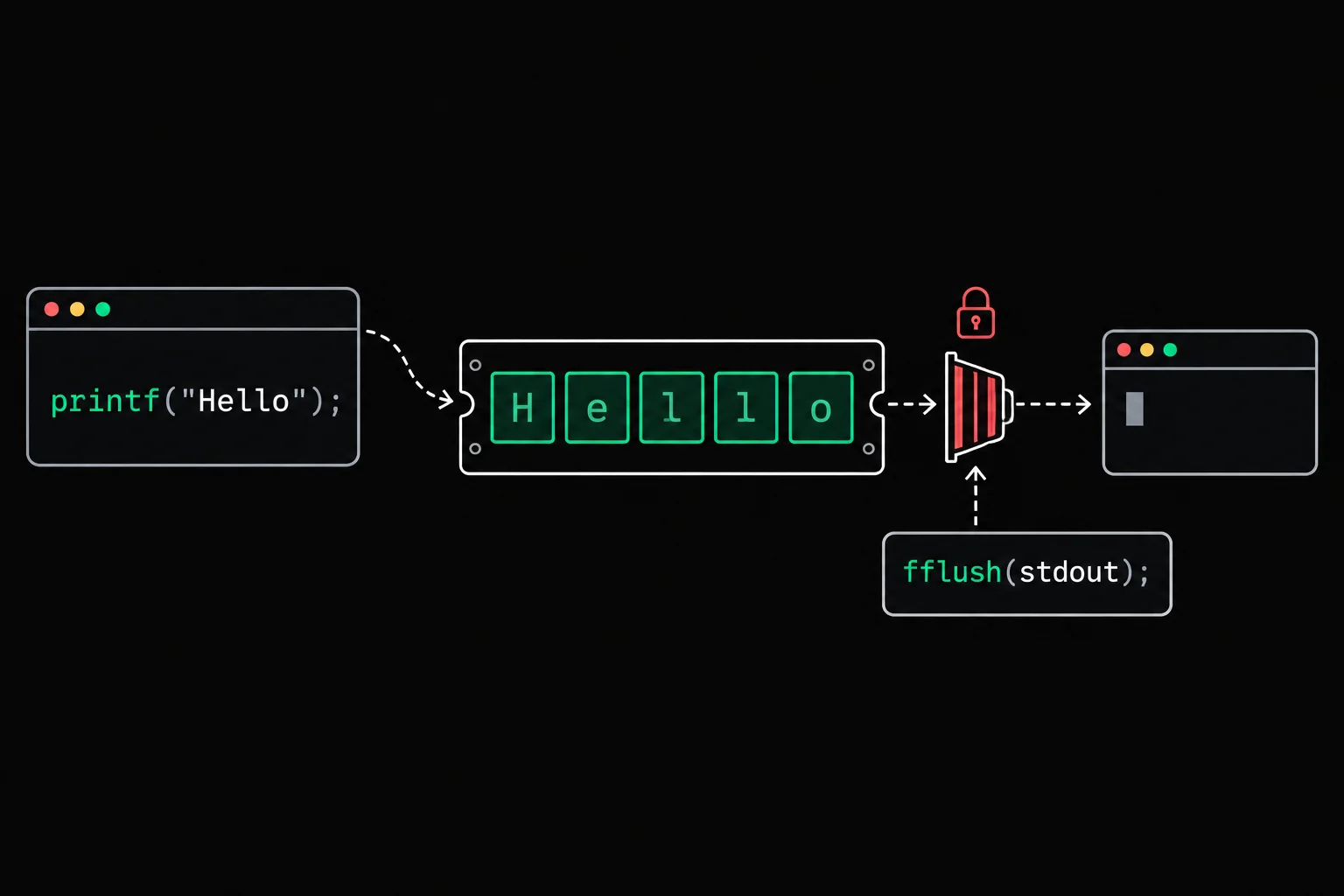
You add a printf to see how far your program gets before it crashes. It crashes, and your message is nowhere to be seen. So you conclude that the crash happens earlier, and you go looking in the wrong place. In fact the printf did run: its text was waiting in a buffer, and it died with the process.
In short
printf does not write straight to the screen: it copies the text into a buffer, an area of your program's memory that the C library empties later. When standard output is a terminal, the buffer is flushed at every \n; when it is a pipe or a file, only when it is full or when the program exits normally. A crash kills the process before that flush, and the pending text is lost. To force it out, call fflush(stdout) right after the message, or write your traces to stderr, which is unbuffered.
Why doesn't printf print anything before a crash?
Because output happens in two steps, and the crash lands between them. This program announces what it is doing, then reads an integer through a null pointer:
#include <stdio.h>
int main(void){    int *score = NULL;
printf("Loading profile\n"); printf("Reading the score..."); printf("%d\n", *score); return 0;}$ gcc -Wall -Wextra -g crash.c -o crash$ ./crashLoading profileSegmentation faultLine 8 ran before line 9, which crashed. Yet "Reading the score..." appears nowhere. If you trusted the output, you would look for the bug between lines 7 and 8.
printf(3) formats the text and stores it in the stdout buffer, a plain byte array that belongs to your process. Only when that buffer is flushed does the C library call write(2), the system call that actually hands the bytes to the kernel, and from there to the terminal.
- printf()formats the text
- stdout bufferan array inside your process
- write(1, ...)system call
- terminalor a pipe, or a file
The flush happens when the buffer is full, when you call fflush(3), and when the program exits normally: a return from main or a call to exit, which flushes every open stream. A SIGSEGV stops the process on the spot. Nothing gets flushed, and the buffer vanishes with the rest of the memory.
Why \n changes everything in a terminal
The first line made it out because it ended with \n. When stdout is connected to a terminal, the C library puts it in line-buffered mode: every \n triggers a flush. "Reading the score..." had no \n, so it was still waiting for the rest of its line.
There are three modes, and the library picks one based on what the stream is connected to:
| Stream | Connected to | Mode | The text goes out |
|---|---|---|---|
stdout | a terminal | line buffered | at every \n, at fflush, at normal program exit |
stdout | a pipe or a file | fully buffered | when the buffer is full, at fflush, at normal program exit |
stderr | anything | unbuffered | immediately |
The C standard sets the principle: stdout is fully buffered if and only if it can be determined not to refer to an interactive device, and stderr is not fully buffered at startup. Line buffering for a terminal is the Unix convention, followed by glibc and musl alike.
It is also what happened in the scanf-without-& example: "Your age: " never appeared because it had no \n and scanf(3) crashed before any flush. One detail makes that case even trickier. Before reading standard input when it comes from the keyboard, glibc flushes stdout, so the prompt would have been visible if the age had been typed by hand. In the example, the age came from echo 19 |, the input was a pipe, and glibc flushed nothing.
Why everything disappears in a pipe or a file
Send the same program's output into a pipe or a file, and this time even the first line disappears:
$ ./crash | cat; echo ${PIPESTATUS[0]}139$ ./crash > output.txtSegmentation fault$ cat output.txtstdout is no longer a terminal, so it switches to fully buffered mode. The \n after "Loading profile" no longer triggers anything, and both lines die in the buffer. Bash does not even report the crash in the first case: the status of a pipeline is the status of its last command, cat, which finished fine. The PIPESTATUS variable keeps the status of each command, and 139 (128 + 11, the number of SIGSEGV) confirms that crash crashed.
The trap turns nasty when the program writes a lot before crashing. This one prints a thousand lines, then dereferences a null pointer:
#include <stdio.h>
int main(void){    int *end = NULL;
for (int i = 1; i <= 1000; i++) printf("entry %d\n", i); printf("%d\n", *end); return 0;}$ ./loop | tail -n 2entry 829entry 830$ ./loop | wc -c8192Only 8,192 bytes came out, in complete blocks. The last 170 lines, the ones right before the crash, stayed in the buffer. If you redirect the output to a file to find out where your program stops, you lose precisely the lines you care about. The block size depends on the system, so do not treat it as a constant.
Under musl, in the Grademe exercise terminal, the result differs on one point. musl starts in line-buffered mode and only checks whether stdout is a terminal at the first flush. The first line that ends in \n therefore always gets through, then musl switches to fully buffered mode, like glibc:
$ ./crash | cat; echo ${PIPESTATUS[0]}Loading profile139Why printf and write come out in the wrong order
write does not go through the stdout buffer. If you mix the two on the same output, the order on screen depends on the buffering mode:
#include <stdio.h>#include <unistd.h>
int main(void){ printf("1. printf\n"); write(1, "2. write\n", 9); printf("3. printf\n"); return 0;}$ gcc -Wall -Wextra -g order.c -o order$ ./order1. printf2. write3. printf$ ./order | cat2. write1. printf3. printfIn the terminal, each \n flushes the buffer and the order holds. In the pipe, both printf calls wait for the end of the program, and the write, which went out immediately, jumps ahead of them. The puts man page says it plainly: mixing stdio output functions with calls to write on the same file descriptor gives undefined results. Pick one or the other for a given output, or call fflush(stdout) before each write.

write_str
Write write_str, which prints a string one character at a time with write on file descriptor 1, adding nothing. There is no buffer between your code and the terminal: each byte goes out the moment you write it.
How to force the output
The most direct fix is to call fflush(stdout) right after the message that must come out, before the suspicious code:
#include <stdio.h>
int main(void){    int *score = NULL;
printf("Loading profile\n"); printf("Reading the score..."); fflush(stdout); printf("%d\n", *score); return 0;}$ ./flushLoading profileReading the score...Segmentation fault$ ./flush | catLoading profileReading the score...Both lines come out, in the terminal and in the pipe: fflush called write before the crash.
For debug traces, stderr is often a better choice. It is unbuffered, and | or > do not redirect it: your traces stay on screen while the real output goes to the file.
#include <stdio.h>
int main(void){    int *score = NULL;
fprintf(stderr, "Loading profile\n"); fprintf(stderr, "Reading the score..."); printf("%d\n", *score); return 0;}$ ./stderr | catLoading profileReading the score...You can also turn off stdout buffering for the whole program with setvbuf(stdout, NULL, _IONBF, 0);, or ask for line buffering even in a pipe with _IOLBF. The call must come before anything is written to stdout. With that line added at the top of main in crash.c:
$ ./setvbuf | catLoading profileReading the score...Finally, there is the fix that sidesteps the whole question: to locate a crash, do not hunt for the line with printf. Compiled with -g and run under gdb(1), the program reports the exact line that crashed, as shown in the segmentation fault article.
puts
Rewrite puts(3) using only write: the string, then exactly one \n, even for an empty string, and a non-negative return value. Your version has no buffer, so nothing can get stuck in it when the program crashes.
Frequently asked questions
Why does my text only appear when the program ends?
Because it has no \n, or because the output goes to a pipe or a file. The text waits in the buffer, and normal program termination (return from main or exit) flushes every stream at once. A fflush(stdout) after the message sends it out immediately.
Then why does "Segmentation fault" show up?
The shell prints it, after noticing that your process was killed by a signal. It goes through none of your program's buffers. In a pipe, bash does not necessarily print it, as shown above.
Should I write fflush(stdin) to clear the keyboard input?
No. The C standard only defines fflush for output streams: on an input stream, the behavior is undefined. POSIX extends it to files on disk, not to terminals or pipes. To discard the rest of a typed line, read up to the \n.
Why does my printf appear twice after a fork?
Because fork copies the whole memory of the process, stdout buffer included. A printf("before fork ") without \n ends up in both the parent's buffer and the child's, and each one flushes it when it exits. Call fflush(stdout) right before fork. Processes are covered in fork, wait, pipe and exec.
Does turning off the buffer with setvbuf slow the program down?
Without a buffer, each printf turns into at least one system call, which is expensive in a program that writes a lot. For debugging, it does not matter. In production, prefer fflush calls placed where the order matters.
Sources