memcmp vs strcmp in C: bytes, strings and lengths
Compare memcmp and strcmp with embedded null bytes, unsigned values and unequal buffer lengths. See why an equal prefix doesn't mean equal data.
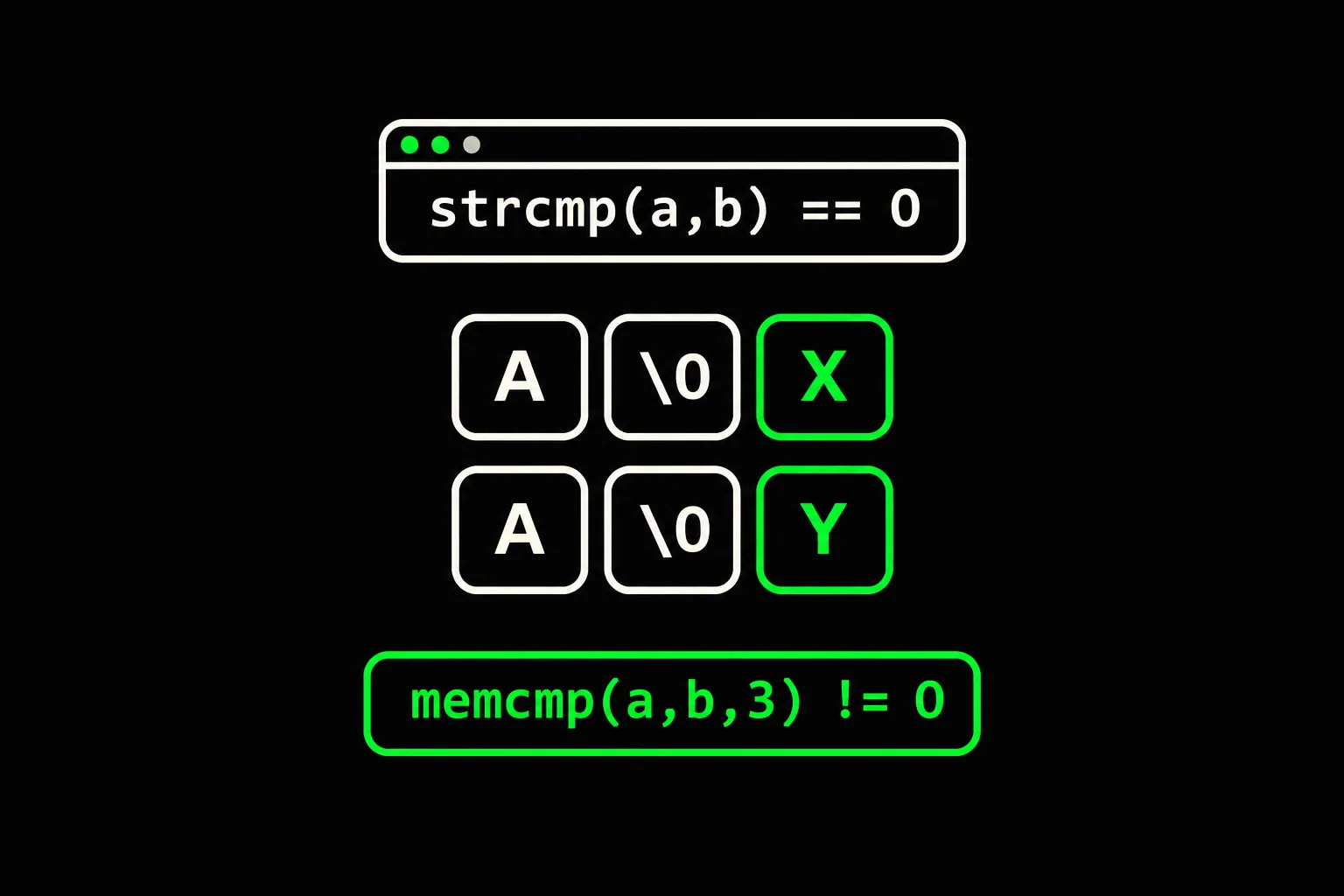
Two arrays hold the same text, yet a memory comparison reports a difference. Before changing the condition, decide what you mean to compare: a null-terminated string, a prefix or the entire buffer.
In short
strcmp(3) compares two strings up to their null terminator; memcmp(3) compares the first n bytes of two regions, including null bytes. Both interpret bytes as unsigned char and return a negative, zero or positive integer. To test whether two complete buffers are equal, check their lengths too: an equal prefix isn't enough.
Why can the same text produce different results?
The text ends at the first '\0'. Later bytes still belong to the array, but they aren't part of that string. This program initializes every element, so no indeterminate values affect the result.
#include <stdio.h>#include <string.h>
int main(void){    const char a[] = {'A', '\0', 'X'};    const char b[] = {'A', '\0', 'Y'};    const unsigned char high[] = {0xff};    const unsigned char low[] = {0x01};
printf("strcmp(a, b) == 0: %d\n", strcmp(a, b) == 0); printf("memcmp(a, b, 2) == 0: %d\n", memcmp(a, b, 2) == 0); printf("memcmp(a, b, 3) < 0: %d\n", memcmp(a, b, 3) < 0); printf("memcmp(high, low, 1) > 0: %d\n", memcmp(high, low, 1) > 0); printf("memcmp(a, b, 0) == 0: %d\n", memcmp(a, b, 0) == 0); return 0;}$ gcc -std=c17 -Wall -Wextra -Werror compare.c -o compare$ ./comparestrcmp(a, b) == 0: 1memcmp(a, b, 2) == 0: 1memcmp(a, b, 3) < 0: 1memcmp(high, low, 1) > 0: 1memcmp(a, b, 0) == 0: 1The first line prints 1 because both strings are "A". Over two bytes, the regions also match: 'A', followed by '\0'. Over three bytes, the comparison reaches 'X' and 'Y'. Their order makes this result negative.
- a[0]'A'
- a[1]'\0'end of the string
- a[2]'X'still inside the buffer
In b, only the last element differs: it holds 'Y'. The terminator is a byte with value zero, not the character '0'. An empty string starts with that terminator. For the storage rules, see strings in C.
Which length compares two whole buffers?
The lengths must match before you compare the contents. Otherwise, comparing only as many bytes as the shorter buffer contains proves that a prefix matches, not that the buffers are equal.
#include <stddef.h>#include <stdio.h>#include <string.h>
int same_bytes(const void *a, size_t na, const void *b, size_t nb){    if (na != nb)        return 0;    if (na == 0)        return 1;    return memcmp(a, b, na) == 0;}
int main(void){ const unsigned char a[] = {'A'}; const unsigned char b[] = {'A', 'B'}; printf("prefix: %d\n", memcmp(a, b, sizeof a) == 0); printf("whole: %d\n", same_bytes(a, sizeof a, b, sizeof b)); printf("equal: %d\n", same_bytes(b, sizeof b, b, sizeof b)); printf("empty: %d\n", same_bytes(NULL, 0, NULL, 0)); return 0;}$ gcc -std=c17 -Wall -Wextra -Werror buffers.c -o buffers$ ./buffersprefix: 1whole: 0equal: 1empty: 1The first comparison reads just one byte: 'A'. It says nothing about the extra 'B'. same_bytes rejects different lengths first, then compares every byte when the lengths match.
The helper has a specific contract: for a nonzero length, each pointer must designate at least that many readable bytes. With two zero lengths, it returns before calling the library, so this helper accepts two NULL pointers. That does not establish that passing NULL to memcmp(3) is valid, even with a zero count.
sizeof a measures the local array in this example. Inside a function receiving a pointer, sizeof measures the pointer, not the region it points to. Pass the length separately, as the helper does. An array and a pointer have different types.
Why check the sign instead of -1 or 1?
The contract guarantees the sign, not an exact result. Use < 0, == 0 or > 0. The third line of compare.c deliberately converts the result into a condition: its printed 1 means true, not that the library returned 1.
Bytes are compared as unsigned char. The line using 0xff and 0x01 checks that 255 comes after 1, even on a machine where plain char can be signed. An implementation that directly subtracts two plain char values can reverse the order for high bytes.
For equality, remember that if (memcmp(a, b, n)) enters the branch when the regions differ. Writing == 0 explicitly makes the intended test easier to read.

memcmp
Implement the comparison byte by byte. The evaluated cases cross an embedded null, stop at the requested boundary and compare bytes above 127.
Which function fits the data?
Choose the data contract before choosing a function.
What do the inputs represent?
Two terminated strings
strcmp
The null marks the end of the text; later bytes aren't part of the string.
Two binary buffers
Lengths then memcmp
Null bytes are data; complete equality requires matching lengths.
Two C structures
Compare the relevant fields
Padding bytes and memory representations don't define application-level equality.
A structure can contain padding between its fields. Values that match field by field needn't have identical bytes. A memory comparison of integer arrays isn't a numeric sort either: byte order depends on the representation.
Comparing doesn't copy anything. If you need to move bytes into another region, read memcpy versus memmove.
strcmp
Then return to strings: stop at a shared terminator while still detecting when one string extends the other.
Frequently asked questions
Does memcmp stop at the first null byte?
No. A null is an ordinary byte within the requested region. A later difference can determine the result.
Is comparing the minimum of the lengths enough?
For testing a common prefix, yes, provided the regions are readable. For complete equality, no: the lengths must match too.
Does strcmp sort words according to a language?
No. It compares byte codes rather than performing linguistic collation. UTF-8 text is still a sequence of bytes to this function.
Can I compare a secret with memcmp?
It doesn't guarantee timing independent of the contents. For cryptographic secrets, use the comparison primitive provided by your cryptography library.
Sources