Python strip vs removeprefix: stop removing extra letters
Find out why lstrip removes extra letters, choose between strip, removeprefix and removesuffix, and trim tags while preserving their internal spaces.
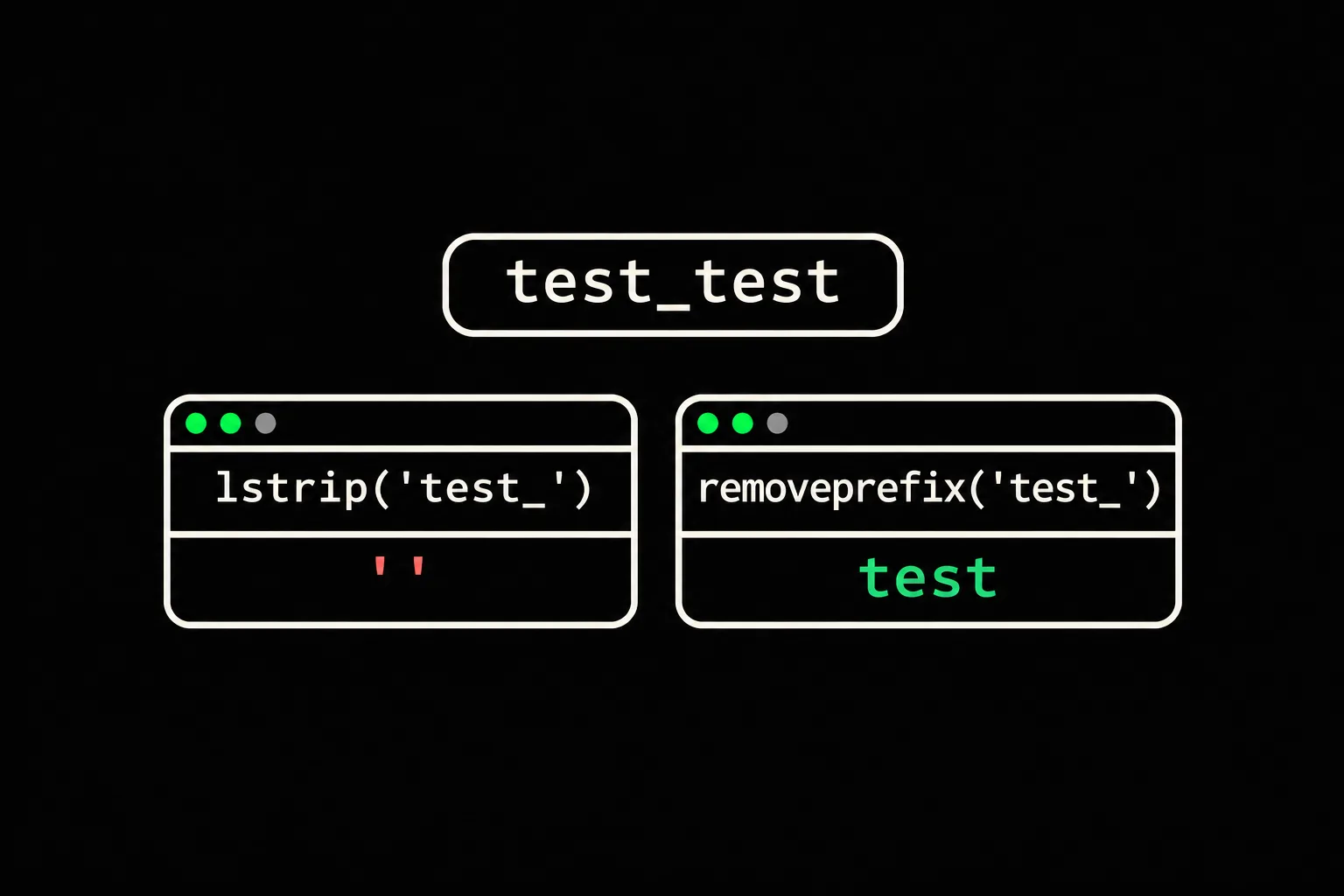
You want to remove a label from the start of a name. You pass that label to lstrip, and part of the name disappears too. The argument means something different from what its spelling suggests.
In short
In Python, strip(chars) removes characters belonging to chars from both ends; lstrip works on the left and rstrip on the right. To remove one exact substring at the start, use removeprefix(prefix); for the end, use removesuffix(suffix). With no argument, strip() removes leading and trailing whitespace while preserving whitespace inside the string.
Why does lstrip remove extra letters?
lstrip("test_") accepts each of the characters t, e, s and _. It keeps going while the next character belongs to that set, even after passing the prefix you meant to remove.
name = "test_test"print(repr(name.lstrip("test_")))print(repr(name.removeprefix("test_")))print(repr(name))$ python3 prefix.py'''test''test_test'Strings are immutable: neither method changes name. You need to use the returned value. Here, the quotes printed by repr make the empty string visible.
Reordering the same characters in the argument does not change the result of lstrip. Character order does matter in an exact prefix. Neither operation needs a regular expression.
Step 1 of 3
Start
- remaining
- test_test
- 0..4test_accepted characters
- 5..8test
All leading characters belong to test_.
Read all steps
1. Start
- remaining
- test_test
- 0..4test_accepted characters
- 5..8test
All leading characters belong to test_.
2. After the first group
- remaining
- test
- 0..4removed
- 5..8testaccepted characters
The next t still belongs to the set; lstrip continues.
3. End
- remaining
- ''
- 0..4removed
- 5..8removed
No characters remain. removeprefix would have kept the second test.
Which method matches the result you need?
First decide what may disappear. Removing surrounding whitespace from input and removing an exact marker are different contracts.
What should be removed?
Whitespace at both ends
text.strip()
Internal spaces remain in place.
Allowed characters at one end
text.lstrip(chars) or text.rstrip(chars)
Each character is handled separately and may be removed repeatedly.
Exact prefix once
text.removeprefix(prefix)
The remainder is kept even if it starts with the same prefix.
Exact suffix once
text.removesuffix(suffix)
A missing match leaves the text unchanged.
A prefix method does not search in the middle, removes at most one occurrence and is case-sensitive. These methods have been available since Python 3.9.
print(repr("tag_tag_news".removeprefix("tag_")))print(repr("other_tag_news".removeprefix("tag_")))print(repr("TAG_news".removeprefix("tag_")))print(repr("news".removesuffix("")))$ python3 once.py'tag_news''other_tag_news''TAG_news''news'An empty suffix removes nothing. Be careful when replacing the method with a slice: text[:-len(suffix)] becomes text[:0] when the suffix is empty. That would discard the entire string.
How do you remove an extension without damaging the name?
To remove exactly .txt at the end of a string, use removesuffix(".txt"). rstrip(".txt") may keep stripping into the name if its final letter belongs to the same set.
name = "text.txt"print(repr(name.rstrip(".txt")))print(repr(name.removesuffix(".txt")))print(repr("text.txt.txt".removesuffix(".txt")))print(repr("text.txt.bak".removesuffix(".txt")))$ python3 suffix.py'te''text''text.txt''text.txt.bak'This rule removes a known suffix. It does not replace general path or extension handling. replace(".txt", "") has a different contract again: it replaces occurrences wherever they appear in the string.
What does strip preserve without an argument?
strip() preserves internal whitespace. An explicit argument such as " " makes only that character removable: a tab at the edge then stops stripping on that side.
text = "\t Board Games \n"print(repr(text.strip()))print(repr(text.strip(" ")))print(repr("\u00a0word\u00a0".strip()))print(repr("\u200bword\u200b".strip()))print(repr(" \t\n".strip()))$ python3 whitespace.py'Board Games''\t Board Games \n''word''\u200bword\u200b'''Python treats the no-break space U+00A0 as whitespace, but not the zero-width space U+200B. Having “space” in a Unicode name is not enough to predict the result.
Collapsing internal whitespace is a separate transformation. The guide to split and its separators explains splitting; the join guide covers rebuilding text. Keep the inside unchanged when the contract requires it.
Should you trim before removing the prefix?
If surrounding whitespace is wrapping rather than content, remove it before looking for the prefix. Otherwise, that prefix is not yet at the start of the string.
text = " tag_news "print(repr(text.removeprefix("tag_").strip()))print(repr(text.strip().removeprefix("tag_")))$ python3 order.py'tag_news''news'When cleaning a list of tags, also decide what to do with empty tags, duplicates and order. strip does not make those decisions for you.

clean_tags
Implement clean_tags: trim surrounding whitespace, lowercase the letters and leave out tags that become empty. Preserve order, duplicates and all internal whitespace, without modifying the input list.
Frequently asked questions
Does strip remove spaces in the middle?
No. It stops at the first character that cannot be stripped on each side. The interior stays intact.
Does lstrip("ab") remove only the prefix "ab"?
No. It removes consecutive a and b characters from the left in any order. For one exact occurrence, choose removeprefix.
Does removeprefix raise an error when the prefix is missing?
No. With string arguments, it returns text with the same value when the prefix does not match.
Can removeprefix take a tuple of prefixes?
No. Choose a prefix using an explicit rule; the order of your candidates may change the result.
Sources