while (!feof) in C: why the last line repeats
Find out why while (!feof) repeats the last line in C. Trace fgets, fix the loop, and handle empty files, missing final newlines and read errors.
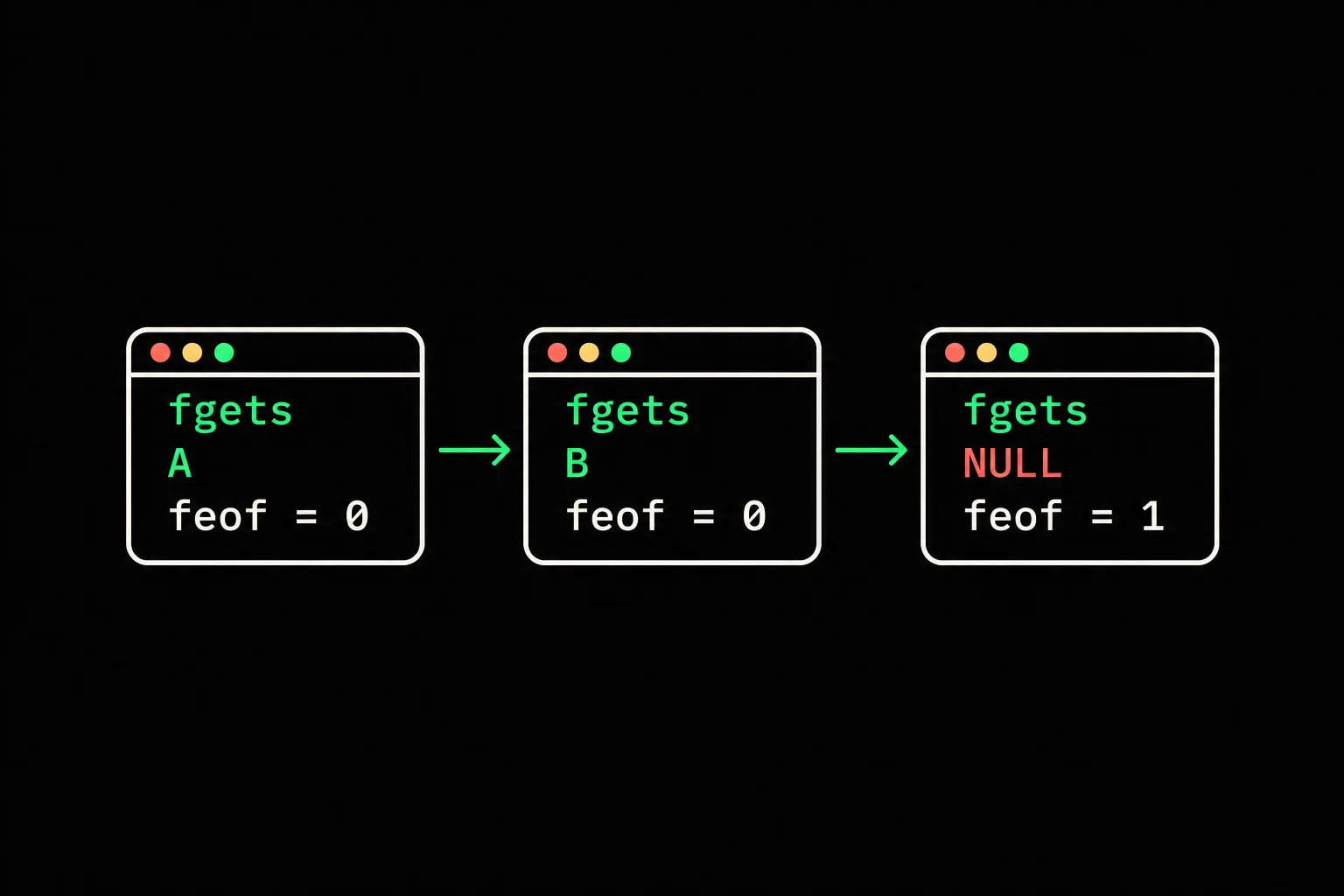
Your program reads a file, then prints its last line twice. The loop seems to check for the end with while (!feof(stdin)). The problem is what that check tells you: the result of a past read, not the next one.
In short
In C, feof tests the stream's end-of-file indicator; it doesn't predict whether the next read will succeed. After reading a newline-terminated line, that indicator may still be clear even when no bytes remain. Use fgets(3) in the loop condition to process only successful reads, then check ferror(stream) after the loop. Testing only feof after reading can also discard a final line that has no newline.
Why does the last line print twice?
The final attempt fails, but your code uses the contents left in the array. This instrumented version prints read=1 when fgets(3) returns the array and read=0 when it returns NULL. The other two numbers show the stream indicators, normalized to 0 or 1 with !!.
#include <stdio.h>#include <string.h>
int main(void){    char line[8] = "";
while (!feof(stdin)) { char *result = fgets(line, sizeof line, stdin); if (ferror(stdin)) return 1; line[strcspn(line, "\n")] = '\0'; printf("read=%d eof=%d error=%d buffer=[%s]\n", result != NULL, !!feof(stdin), !!ferror(stdin), line); } return 0;}$ gcc -std=c17 -Wall -Wextra -Werror bad.c -o bad$ printf 'A\nB\n' | ./badread=1 eof=0 error=0 buffer=[A]read=1 eof=0 error=0 buffer=[B]read=0 eof=1 error=0 buffer=[B]The shell's printf(3) sends two lines to standard input. The reasoning is the same for a file opened with fopen: replace stdin with that stream after checking that opening succeeded.
The second read stops at B's \n. The third tries to read again, encounters the end without obtaining a character and returns NULL. In this specific case, fgets(3) leaves the array unchanged. B prints a second time even though it wasn't read again.
strcspn removes the newline from the array just to make the output readable. It doesn't change the stream. The error check prevents an endless loop on a read error here, but doesn't fix the misuse of the read result.
What happens during the three reads?
With the input A, newline, B, newline, the third call produces no new data. These snapshots are taken after each fgets(3) call, before removing the newline.
Step 1 of 3
Read A
- read
- 1
- feof
- 0
- ferror
- 0
- AA + \nconsumed
- BB + \nnext read
- resultarraysuccessful read
fgets obtained A and its newline. B and its newline remain in the stream.
Read all steps
1. Read A
- read
- 1
- feof
- 0
- ferror
- 0
- AA + \nconsumed
- BB + \nnext read
- resultarraysuccessful read
fgets obtained A and its newline. B and its newline remain in the stream.
2. Read B
- read
- 1
- feof
- 0
- ferror
- 0
- AA + \nconsumed
- BB + \nconsumed
- resultarraysuccessful read
fgets stops at B's newline. No bytes remain, but feof is still 0.
3. Next attempt
- read
- 0
- feof
- 1
- ferror
- 0
- AA + \nconsumed
- BB + \nconsumed
- resultNULLdo not process
fgets encounters the end before reading any character and returns NULL. Using the array again would print B again.
The end isn't an extra slot containing an EOF character. It's a condition the library encounters during a read operation.
Why can testing feof after fgets lose a line?
A call can obtain characters and then encounter the end before a \n. It returns the array containing those characters while also setting the end-of-file indicator.
$ printf 'A\nB' | ./badread=1 eof=0 error=0 buffer=[A]read=1 eof=1 error=0 buffer=[B]The last read succeeded: read=1. Yet eof=1. A check that exits as soon as feof(stdin) becomes true, before processing B, would discard valid data. Here the faulty loop doesn't repeat B: its behavior changes with the final newline. That's why testing just one file can hide the defect.
How should you write a fgets loop?
Use the result of fgets(3) in the condition, then process the array inside the body. After NULL, inspect the error indicator to distinguish an ordinary end from a failed read.
#include <stdio.h>#include <string.h>
int main(void){    char line[8];    size_t count = 0;
while (fgets(line, sizeof line, stdin) != NULL) { line[strcspn(line, "\n")] = '\0'; printf("chunk %zu: [%s]\n", ++count, line); } printf("chunks=%zu eof=%d error=%d\n", count, !!feof(stdin), !!ferror(stdin)); return ferror(stdin) ? 1 : 0;}$ gcc -std=c17 -Wall -Wextra -Werror good.c -o good$ printf 'A\nB\n' | ./goodchunk 1: [A]chunk 2: [B]chunks=2 eof=1 error=0$ printf 'A\nB' | ./goodchunk 1: [A]chunk 2: [B]chunks=2 eof=1 error=0$ ./good < /dev/nullchunks=0 eof=1 error=0Both inputs produce two processed chunks. Empty input produces none. No uninitialized contents are used because the body never runs after a failed read.
The name chunk is deliberate: with eight array elements, fgets(3) can store at most seven characters followed by a null terminator. A long line arrives in several chunks. Assemble them if your application needs a complete line.
$ printf 'abcdefghij\n' | ./goodchunk 1: [abcdefg]chunk 2: [hij]chunks=2 eof=1 error=0This demonstration expects text without embedded null bytes. For binary input, choose an interface that also supplies the number of bytes read. The fgets reference explains its string contract. A fgets call after scanf deals with a newline still waiting in the stream, a different cause of surprising output.
How can you check that a read error isn't mistaken for normal completion?
Check ferror after the loop and return failure if it's set. On Linux with glibc, redirecting a directory into our program triggers a read error:
$ ./good < .; echo "status=$?"chunks=0 eof=0 error=1status=1This command is a Linux test, not a portable way to manufacture an error on every system. It shows why waiting only for feof isn't enough: a read can fail while that indicator remains clear.
In an application, add an error message appropriate to the operation. Don't keep processing the array after failure; its contents aren't guaranteed after a read error.

mini_scanf
Implement the %s, %d and %c conversions in mini_scanf. Distinguish successful conversions from the end of input: EOF is reserved for input ending before any conversion is possible. This is an advanced exercise about return values, not a request to copy the fgets loop.
Frequently asked questions
Does feof return EOF?
No. It returns zero if the end-of-file indicator is clear, and a nonzero value otherwise. EOF is an integer constant used by other functions, such as fgetc. fgets returns a pointer or NULL.
Should I clear the array on every iteration?
That doesn't fix the condition. You would still process an attempt that produced no data. Check the fgets result before using the array.
How does the rule apply to fscanf?
Check the expected number of conversions, for example 1 for a single conversion. A zero return can mean a matching failure without end-of-file. Also validate values and their ranges; converting with strtol allows explicit validation of an integer supplied as text.
Can clearerr make reading work again?
It clears the indicators, but repairs neither the source nor the loop logic. Calling it here without resolving the cause can simply repeat the same failures.
Sources